
 Share
Share
 Print
Print
|
|
|
|
|


Trax Utilities button
TraxDoc/ Update/ TraxDoc Master/ TraxDoc Document, File Explorer Tab/ New Button/ Load XML Button/ Trax Utilities Button
In previous versions of TRAX, it was necessary to perform additional functions that have since been seamlessly integrated into the XML Load process.
From the TraxDoc SGML Load pop-up window, select the Trax Utilities  button. This button is used to manage specific types of image files and it can also help extract zipped OEM files.
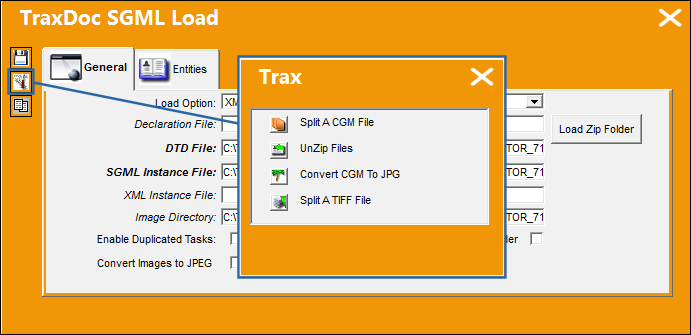
For more information on the Trax Utilities button refer to Load XML Content Button.
Note: In version X and later, these features are performed automatically. The UnZip files feature has been replaced by the Load Zip Folder button in the TraxDoc SGML Load window.
Share
Print
|
©1997-2026 Trax USA Corp. All rights reserved. This manual may not be copied, photocopied, reproduced, translated, or converted to any electronic or machine-readable form, in whole or in part, without prior written approval from Trax USA Corp. |
 |