
 Share
Share
 Print
Print
|
|
|
|
|


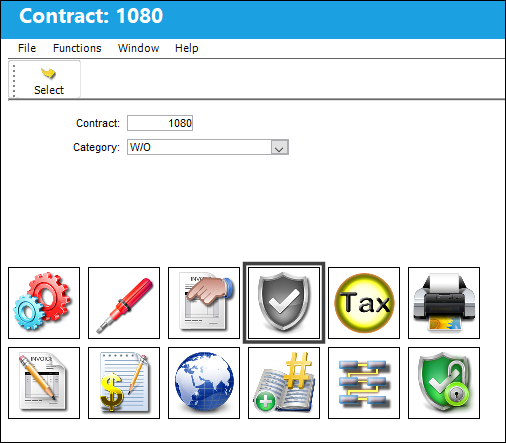
The Authorization  button allows users to require the customer's authorization when a Max Material Cost or a Non-Routine's Max labor Hours amount is exceeded. (For instance, before work is performed that will exceed a certain cost threshold, the customer will need to authorize the pending work before the work can be be performed.) These authorizations can be set up for specific P/N Categories (Consumable, Kit, Repairable, or Serialized), or for the labor hours accrued against a Non-Routine Task Card.
Authorization requirements must first be set up by creating a link between the Customer Contract and a Third Party Work Order. Once a Requisition has been created for the Third Party Work Order, the system will flag the Requisition informing the user that the Purchase must first be authorized before the Requisition for the part(s) can be authorized.
Select the Authorization button in the Customer Contract detail window.
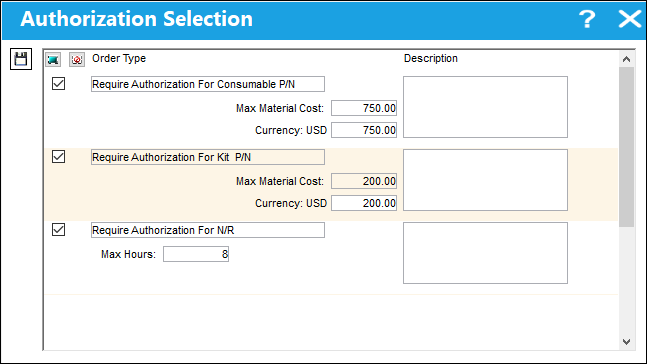
The Authorization Selection window appears.
For detailed examples on how this functionality works, refer to Authorization Requirement Setup via the Authorization Button.
The following information/options are available in this window:
_____________________________________________________________________________________
Selection checkbox
Selects the Order Type entry along with the Max Cost/Hours information. These checkboxes must be selected in order for the Categories to be in effect for the contract.
Order Type
The types of items that will require authorization. These can be set up for parts based on the part's P/N Category or for the W/O's Non-Routine Task Card(s).
When a Requisition for parts exceeding the Max Material Cost (below) is created for the Third Party Work Order, the Third Party Work Order Authorization flag will appear on the Requisition Detail. The Requisition can only be authorized after the associated 3rd Party W/O has been authorized and accepted.
If the total cost of the serialized parts that are requisitioned surpasses the Max Material Cost, then Third Party W/O authorization will be required. If the total costs for the serialized parts do not exceed the Max Material Cost, then Third Party W/O authorization is not required.
Each of these 'Order Types' are mapped to a P/N Category transaction code. For example, all parts defined as 'Serialized' parts through their P/N Category will be in effect when the 'Require Authorization for Serialized P/N' option is used against the contract.
There is an authorization option for each of the P/N Category types:
- Require Authorization for Consumable P/N
- Require Authorization for Kit P/N
- Require Authorization for Repairable P/N
- Require Authorization for Serialized P/N
Theses Authorizations are triggered only when the Requisition is created for the Third Party W/O through the Requisition/Update/Requisition window or through the Requisition button of the Inventory/Query/Inventory Query window. (This functionality does not work with Picklists.)
For detailed information refer to Authorization Requirement Setup via the Authorization Button.
If the labor hours required for the W/O Non-Routine Task Card exceeds the contract's Max Hours (below), the system will flag the W/O Non-Routine Task Card window to inform the user that the 3rd Party Work Order must be authorized. The task card cannot be started until the 3rd Party W/O is authorized via the Customer Authorization window.
- Require Authorization for N/R
For detailed information refer to Authorization Requirement Setup via the Authorization Button.
Max Material Cost
The maximum cost of all materials required for the specified P/N Category. This field refers to the requisitioned part's Average Cost field as defined in the P/N Master, Costing tab. This field is in effect when an applicable part is saved on a Requisition for the contract's 3rd Party W/O. When the Max Material Cost threshold is exceeded by the Requisition, the contract will require this additional authorization. For detailed information refer to Authorization Requirement Setup via the Authorization Button.
This field is only available for the 'Requires Authorization for P/N' options.
Max Hours
The highest amount of hours worked. This field refers to the N/R Task Card's required labor hours as defined in the N/R T/C's Items. When the Max Hours threshold is exceeded by the N/R T/C, the contract will require this additional authorization. For detailed information refer to Authorization Requirement Setup via the Authorization Button.
This field is only available for the 'Requires Authorization for N/R' option.
Description
A description of the type of authorization required.
_____________________________________________________________________________________
Share
Print
|
©1997-2026 Trax USA Corp. All rights reserved. This manual may not be copied, photocopied, reproduced, translated, or converted to any electronic or machine-readable form, in whole or in part, without prior written approval from Trax USA Corp. |
 |