
 Share
Share
 Print
Print
|
|
|
|
|


Customer Contract
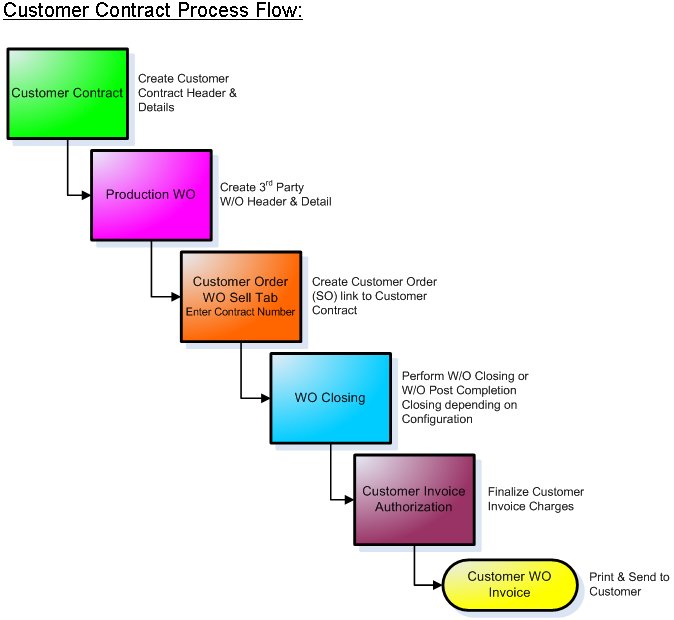
The Customer Contract option was created to implement customer contractual terms for third party work orders (i.e. work being billed to your customers). This feature works in a more advanced way than the Task Card Sell Tab and the Customer Order Work Order Sell Tab. It allows definition of specific terms and markups relating to labor and materials for each Customer (and also each event with a customer if the rates are different by Contract Type), with caps and limits that can be applied.
Once a Work Order has been completed and closed – the Customer Sales department may go into the Work Order billing process via Customer Invoice Authorization (in a graphical explorer format) and amend any prices/rates and data in order to produce the final invoice for the customer. Journal Entries are written to the financial accounts to reflect the ‘cost of sale’ and sales amounts along with the relevant Accounts payable entries.
The following tabs and buttons are available at the header level.
Customer Contract Header Tabs |
Customer Contract Header Buttons |
|---|---|
|
 Reset button
 New button
 Save button
 Delete button


 Copy button
For information on the options in the detail level, accessed through the Select  button, refer to Customer Contract Detail.
Contract Options
Once the Contract header is created, the following options can be configured for the Contract in the detail window:
- Material

- Labor

- Orders

- Authorization

- Tax

- Print

- Invoice/Quoted Flat Rate

- Credit Limit

- Flat/Surcharge Rate Other

- Flat Rate Task Card

- Classic

- Release for Authorization

For information on the options in the detail level, accessed through the Select button, refer to Customer Contract Detail.
 Third Party Work Order Process
Share
Print
|
©1997-2026 Trax USA Corp. All rights reserved. This manual may not be copied, photocopied, reproduced, translated, or converted to any electronic or machine-readable form, in whole or in part, without prior written approval from Trax USA Corp. |
 |