
 Share
Share
 Print
Print
|
|
|
|
|


Airline Authorization

The Airline Authorization option allows the user to query for Contractor Authorization Request (CA) records based on the following search criteria. The Airline Authorization functionality is used by a contractor (vendor) to create a Non-Routine Task Card for work that is contracted out to them by a customer. With this functionality, both the customer and vendor (accomplishing the work) have access to TRAX. Once the scope of the work is reviewed by the contractor, the contractor can go ahead and submit a Contractor Authorization Request to the customer outlining any unscheduled task(s) that needs to be completed in addition to the work the customer has outlined against the Vendor Contract. The Vendor Contract contains all of the parameters of the contract including all of the tasks (routine and Non-Routine) as well as the flat rate cap limits the customer has defined against the contract. The Airline Authorization window works in conjunction with the Vendor Contract functionality located through the Contract Button via the Vendor Master of the Settings Module. For additional information, refer to the Contract Button.
Note  : The name of this window was changed from W/O Contractor Authorization Request to Airline Authorization in Trax Version 15 and all later releases.
The user may also select the New  button to create new CAs from this window. Contractor Authorization Requests are typically created through the Work Order Header, or Work Order Detail windows via the Contractor Authorization Request Button. For additional information, refer to the Contractor Authorization Request Button via the Work Order section of the Production Training Manual.
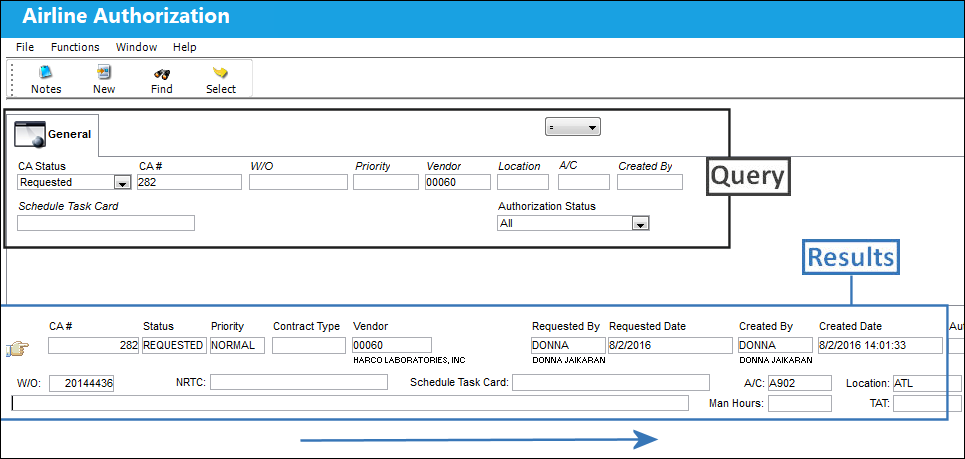
Enter any of the below search criteria to query for a desired CAR and select the Find  button.
Query
The following information/options are available in this window:
_____________________________________________________________________________________
Logic drop down 
Select one of the following logic functions to filter for data:
<= Less than or equal to.
<> Not equal to.
= Equal to.
>= Greater than or equal to.
Like Show data like or similar to.
CA Status
The status of the Contractor Authorization Request.
Open - The CA is authorized but not yet Accepted.
Closed - The CA has been accepted (Task Cards have been authorized/accepted) via W/O Tasks Authorization Explorer.
All - Selecting 'ALL' will display CAs in both Open and Closed status.
CA#
The Contractor Authorization Request number or reference. This number is auto generated by the system upon save.
W/O
The Work Order used to categorize, manage, and schedule work requirements for aircraft maintenance. The Work Order that the Contractor Authorization Request is linked to.
Priority
The priority of the Contractor Authorization Request (i.e. Urgent)
Vendor
The system code for the service/part provider. The vendors are defined in the Vendor Master. All vendors must have the required criteria (i.e. supplier, service, etc) to be used against the particular order type.
Location
The Location for maintenance events, inventory stores, orders, transactions, or training events.
A/C
The individual aircraft tail number.
Created By
The user who created the record.
Schedule Task Card
Any Task Card that is associated to that particular Work Order for the Customer Authorization Request the user is querying for. This does not include the Task Cards that have been imported to the Vendor Contract.
Authorization Status drop down
The Authorization status of the record. Select from the following:
- Accepted
- Rejected
- ALL
_____________________________________________________________________________________
Results:
_____________________________________________________________________________________
CA#
The Contractor Authorization Request number or reference.
Status
The status of the Contractor Authorization Request.
Priority
The priority of the Contractor Authorization Request (i.e. Urgent)
Contract Type
Classification of Contract Type may be defined here (i.e., Heavy Check, AOG,TPW, PBH, Line, etc.)..
Vendor
The system code for the service/part provider.
Requested By
The user who requested the Contractor Authorization.
Requested Date
The date the Contractor Authorization was requested.
Created By
The user who created the record.
Created Date
The date the record was created.
Authorization By
The user who authorized the record.
Authorization Date
The date the record was authorized.
W/O
The Work Order used to categorize, manage, and schedule work requirements for aircraft maintenance. The Work Order that the Contractor Authorization Request is linked to.
NRTC
The Non-Routine Task Card that details non-scheduled maintenance work / findings.
Schedule Task Card
Any Task Card that is associated to that particular Work Order for the Customer Authorization Request the user is querying for. This does not include the Task Cards that have been imported to the Vendor Contract.
A/C
The individual aircraft tail number.
Man Hours
The labor hours (per person) required for this Item.
Location
The Location for maintenance events, inventory stores, orders, transactions, or training events.
TAT
Turn Around Time for the contract.
Authorization
The status of the Contractor Authorization Request.
- Accepted
- Rejected
_____________________________________________________________________________________
The Notes  button is available to view/enter additional information relevant to the record.
Share
Print
|
©1997-2026 Trax USA Corp. All rights reserved. This manual may not be copied, photocopied, reproduced, translated, or converted to any electronic or machine-readable form, in whole or in part, without prior written approval from Trax USA Corp. |
 |