
 Share
Share
 Print
Print
|
|
|
|
|



The Airline Authorization functionality is used by a contractor (vendor) to create a Non-Routine Task Card for work that is contracted out to them by a customer. With this functionality, both the customer and vendor (accomplishing the work) have access to TRAX. Once the scope of the work is reviewed by the contractor, the contractor can go ahead and submit a Contractor Authorization Request to the customer outlining any unscheduled task(s) that needs to be completed in addition to the work the customer has outlined against the Vendor Contract. The Vendor Contract contains all of the parameters of the contract including all of the tasks (routine and Non-Routine) as well as the flat rate cap limits the customer has defined against the contract. The Airline Authorization works in conjunction with the Vendor Contract functionality located through the Contract Button via the Vendor Master of the Settings Module. Once a Vendor Contract has been set up by the customer, and linked to a Work Order, the contractor can create and submit the CA for authorization. The CA is then sent for authorization and once accepted, the contractor can begin the work. For additional information on how to authorize a CA, refer to the Authorization of Contractor Authorization Request. Once work has begun, the customer can utilize the W/O Scope Analysis Button to compare the Task Cards against the vendor contract and the Work Order to see the difference in the work scope.
 Note: The name of the Contractor Authorization Request
  button has been changed to the Airline Authorization button in Trax Version 15 and all later releases. Subsequently, all corresponding window names have also been updated.
 This button is Security Controlled via Production/ Update/ Work Order/ Airline Authorization. For additional information, refer to the Security Explorer, via the System Administration Training manual. Before the contractor can begin this process, some initial set up is required. First, there must be an existing Work Order in Production to link the Vendor Contract to. The customer will link the Work Order to an existing Vendor Contract.
The Airline Authorization button can be accessed from the Work Order Header and the Work Order Detail windows.

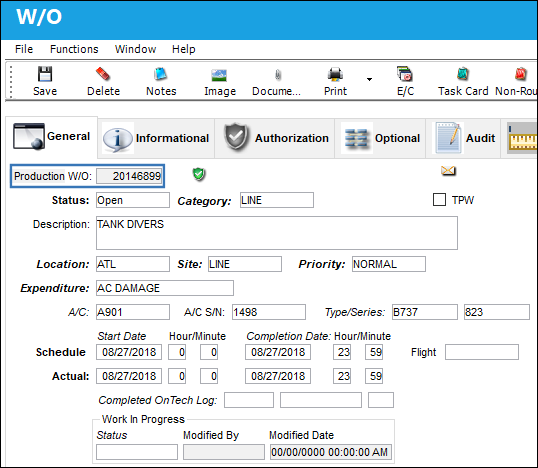
A Production Work Order needs to exist in order to be able to create a Contractor Authorization Request.
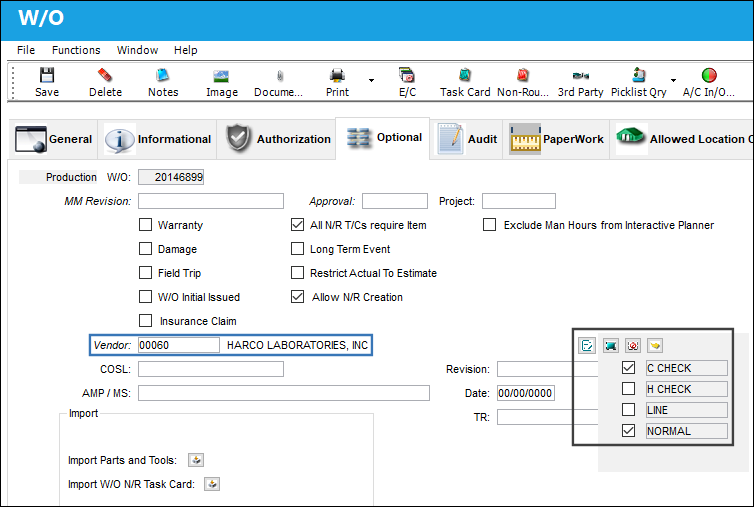
Select the Work Order Header, Optional tab. The following vendor has been specified. Select the Contract Type  button. The following Expenditure Types have been selected.
Select the Airline Authorization button.
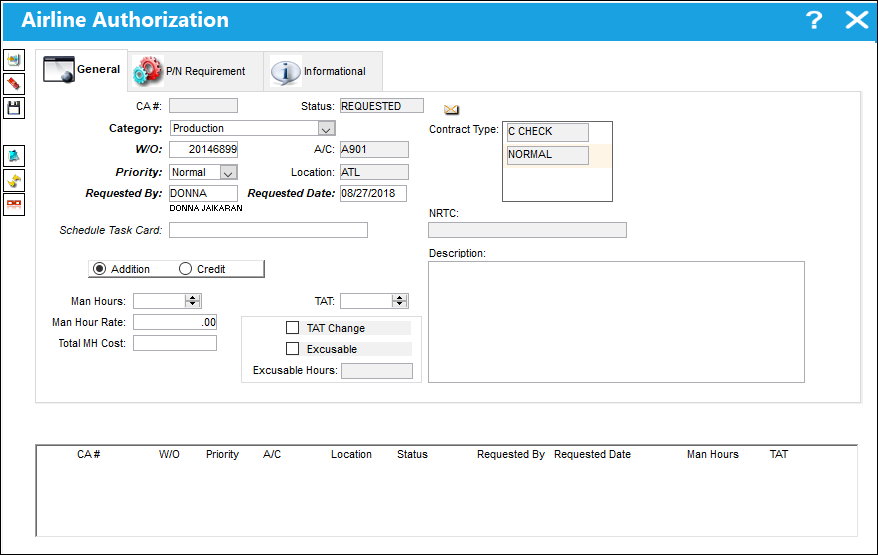
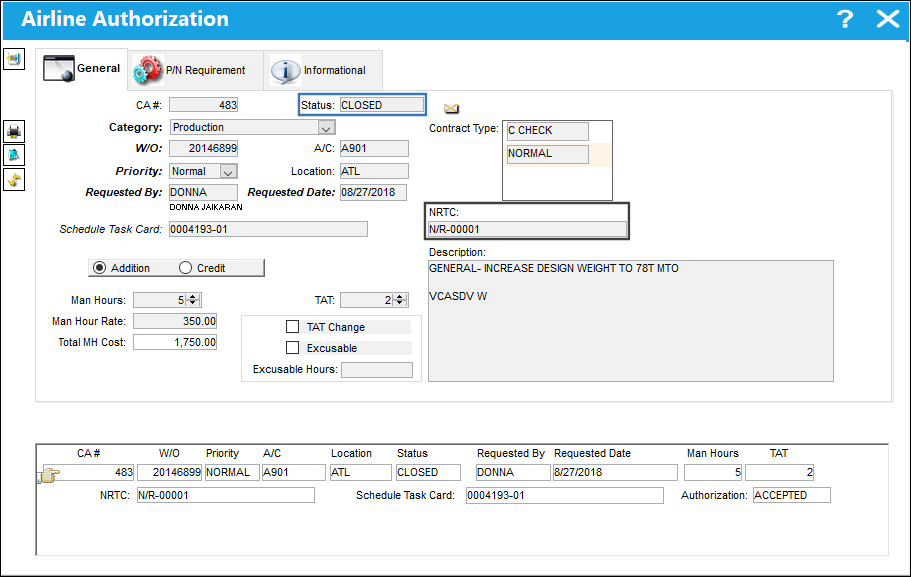
The Airline Authorization window is displayed. Notice that several of the fields in this window are automatically populated based on the information entered against the Work Order.
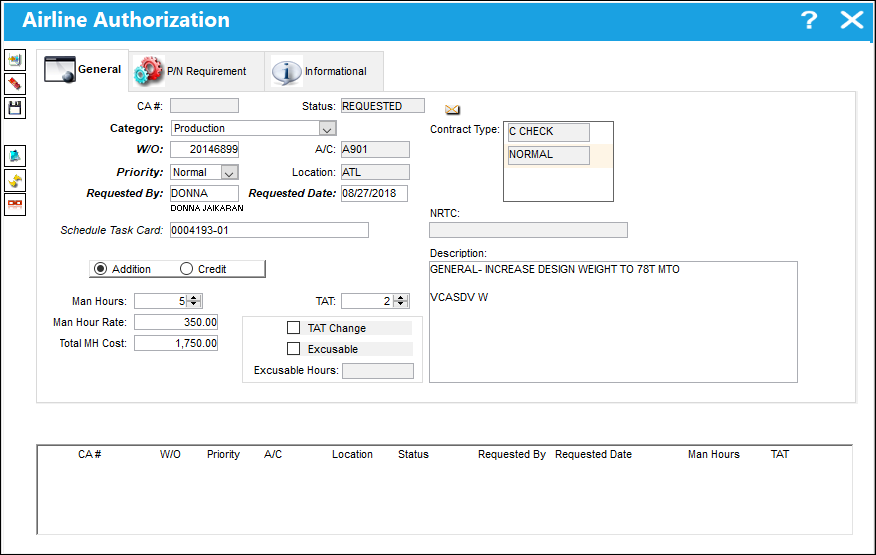
The following information/options are available in this window:
_____________________________________________________________________________________
CA#
The Contractor Authorization Request number or reference. This number is auto generated by the system upon save.
Status
The status of the Contractor Authorization Request.
Requested - The CA has not been authorized or accepted.
Open - The CA is authorized but not yet Accepted.
Closed - The CA has been accepted (Task Cards have been authorized/accepted) via W/O Tasks Authorization Explorer.
All - Selecting 'ALL' will display CAs in both Open and Closed status.
Category Type drop down
Select from one of the following contract types to indicate which department should be billed.
- Production
- Shop
- Training
- PBH
- GSE
Contract Type
Classification of Contract Type may be defined here (i.e., Heavy Check, AOG,TPW, PBH, Line, etc.). The user can set up multiple Contract Types per Vendor.
W/O
The Work Order used to categorize, manage, and schedule work requirements for aircraft maintenance. The Work Order that the Contractor Authorization Request is linked to.
Priority
The priority of the Contractor Authorization Request (i.e. Urgent)
A/C
The individual aircraft tail number.
Location
The Location for maintenance events, inventory stores, orders, transactions, or training events.
Requested By
The user who requested the Contractor Authorization.
Requested Date
The date the Contractor Authorization was requested.
Schedule Task Card
The Schedule Task Card that is associated to the Work Order for the Customer Authorization Request.
NRTC
The Non-Routine Task Card that details non-scheduled maintenance work / findings. This is the Non-Routine Task Card that was created via the CA request.
Addition radio button
Select this radio button if the user (contractor) is adding additional work to the scheduled maintenance that will be billed to the customer.
Credit radio button
Select this radio button if the user (contractor) is crediting work for the scheduled maintenance.
Man Hours
The labor hours (per person) required for this Item.
Man Hour Rate
The rate per hour that will be charged to the customer for the additional unscheduled maintenance against the contracted Work Order.
Total MH Cost
This is the Man Hour Rate multiplied by the number of Man Hours for the additional maintenance (NRTC). This value is automatically calculated by the system upon entering the Man Hours and Man Hour Rate.
TAT
Turn Around Time for the contract.
TAT Change checkbox
If this checkbox is selected, it is because the customer selected the TAT CHG checkbox in the W/O Tasks Authorization window to change the turn around time for the vendor contract during the Task Card Authorization process. This checkbox is protected in the Contractor Authorization Request window and is view only.
TAT Excusable checkbox
If this checkbox is selected, it is because the customer changed the turn around time for the vendor contract during the Task Card Authorization process. This checkbox is protected in the Contractor Authorization Request window and is view only. This checkbox is informational only.
Excusable Hours
This is the new turn around time, which was updated via the Task Card Authorization process via the W/O Tasks Authorization Explorer window. This field is protected in the Contractor Authorization Request window and is view only.
Description
Enter a description for the Contractor Authorization Request.
 CHOMITWOCA - (Characters to Omit in Contractor Authorization Request Description) - When set to Yes, TRAX will not allow users to enter special characters that are specified in the Config Other field in the Contractor Authorization Request Description field. When set to No, Trax will allow users to enter special characters in the Contractor Authorization Request Description field.
_____________________________________________________________________________________
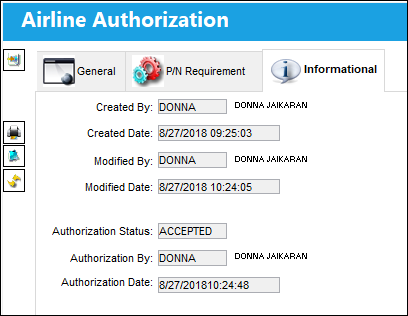
Relevant information can be viewed or included through the Airline Authorization, Informational Tab and the Notes  button.
Additional information is added to the Contractor Authorization Request such as a Schedule Task Card, Man Hours, Man Hours Rate, etc.
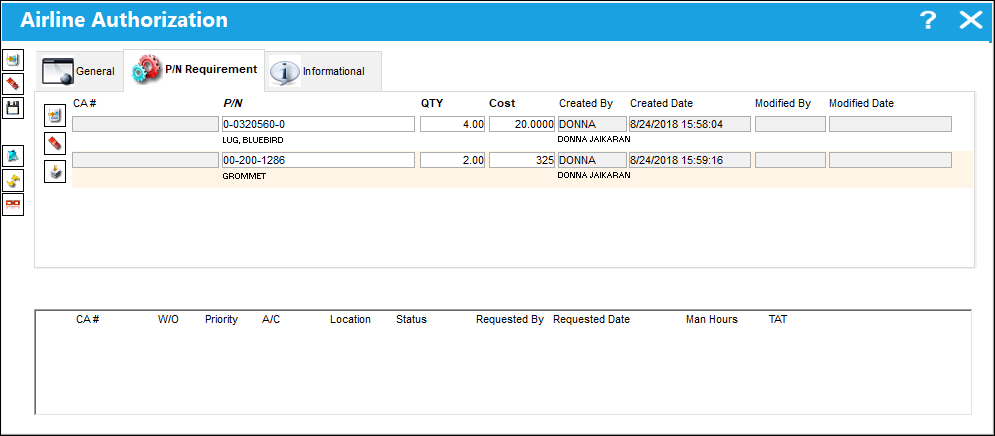
Go to the P/N Requirement tab. Use the New  button to add P/N Requirements to the Contractor Authorization Request.
The Import  button may be used to import multiple P/N records in one single step.
Save the P/N Requirements.
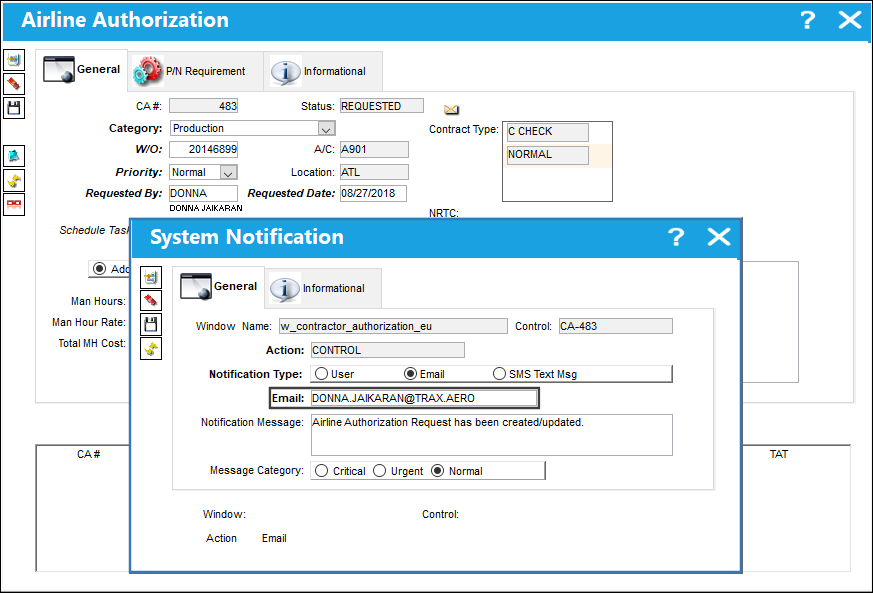
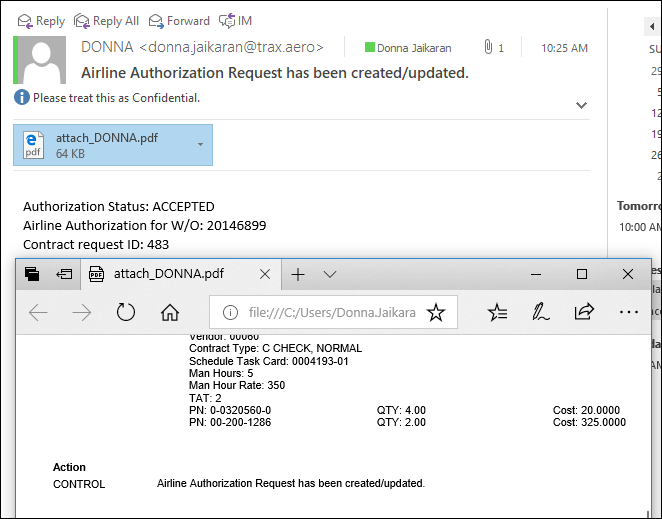
A CA# has been assigned. Every time a CA is saved, or updated, the System Notification window will be displayed. Specify the type of notification for this specific CA. In the below example, the contractor has specified and email notification. Save the record.
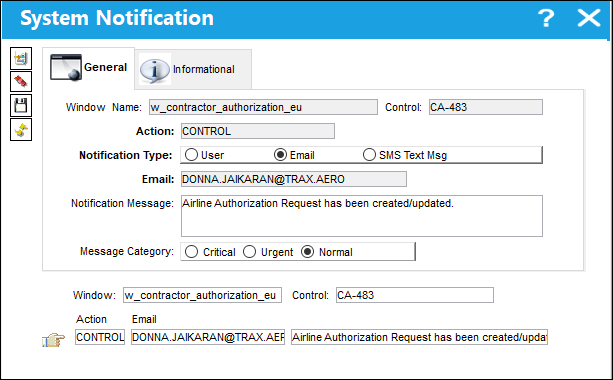
The System Notification has been saved. Exit this window.
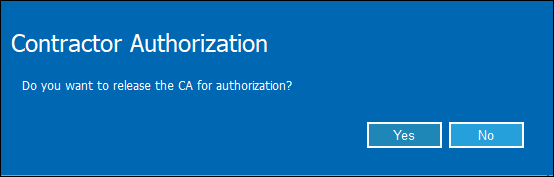
While the System Notification is sent out, a prompt appears asking the contractor if they would like to release the CA for authorization. Selecting 'No' will place the contract on HOLD status.
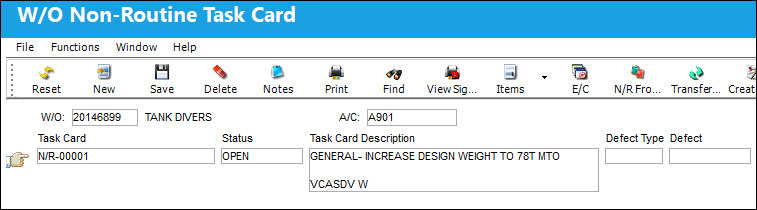
The CA is now in 'CLOSED' status and a Non-Routine Task Card is created.
The CA goes to CLOSED status because switch WOTSKNWAUT is set to No. If the switch were set to Yes, the CA would be released for authorization and will be in OPEN status until the Non-Routine Task Card is approved.
With the Contractor Authorization Request in CLOSED status, the Save and Delete buttons have been removed from the window and all fields have been locked from editing.
The Airline Authorization window can support multiple Vendor Contracts.
The CA is accepted.
The system notification that was sent to the customer from this CA is displayed.
The Non-Routine Task Card remains in OPEN status.
Once the CA has been authorized, the customer can utilize the W/O Scope Analysis Button to compare the Task Cards against the vendor contract and the Work Order to see the difference in the work scope.
Share
Print
|
©1997-2026 Trax USA Corp. All rights reserved. This manual may not be copied, photocopied, reproduced, translated, or converted to any electronic or machine-readable form, in whole or in part, without prior written approval from Trax USA Corp. |
 |