
 Share
Share
 Print
Print
|
|
|
|
|


The Work Order Task Card and Non Routine Search  button takes the user to the W/O Task Card and Non-Routine Search window. This window allows the user to query for both Task Cards and Non-Routine Task Cards based on the following search criteria. Enter any of the below search criteria to query for a desired Task Card/Non-Routine Task Card and select the Find
  button. As with the majority of the query selections on the system, it is better to select as many parameters as required to minimize the search result.
 The Work Order Task Card and Non Routine Search button is security controlled via Production/ Update/ W/O/ W/O Non Routine Express Search Button. For additional information, refer to the Security Explorer via the System Administration Training Manual.
In the following example, the user has elected to search for Task Cards/Non-Routine Task Cards via a specific location. Enter AAA and select the Find button (highlighted below). The search results appear in the lower half of the window.
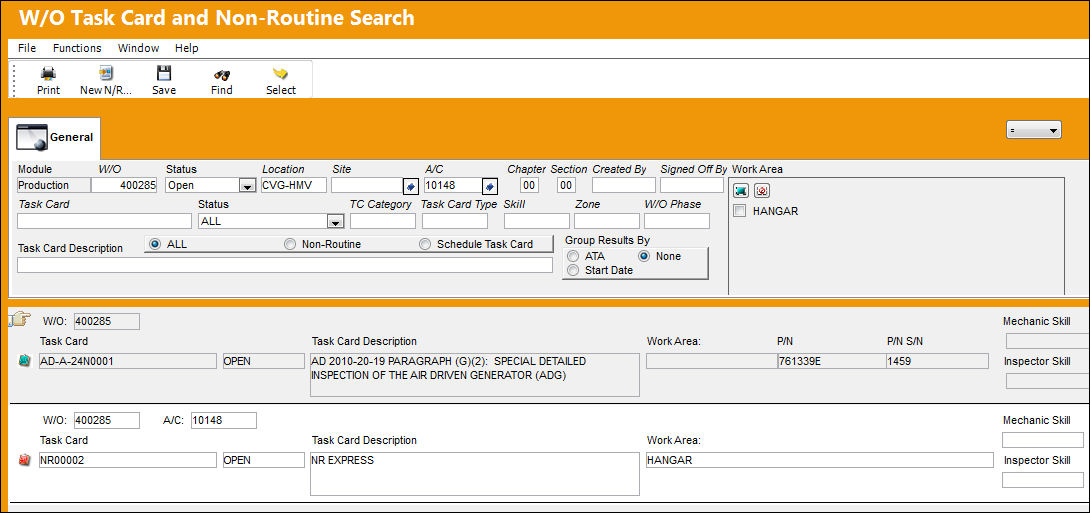
For additional information, refer to the W/O Task Card and Non-Routine Search, via the Production Training Manual.
Share
Print
|
©1997-2026 Trax USA Corp. All rights reserved. This manual may not be copied, photocopied, reproduced, translated, or converted to any electronic or machine-readable form, in whole or in part, without prior written approval from Trax USA Corp. |
 |