
 Share
Share
 Print
Print
|
|
|
|
|


The Task Priority  button allows the user to prioritize tasks for a Work Order.
Select the Task Priority button to view the W/O Task Priority window.
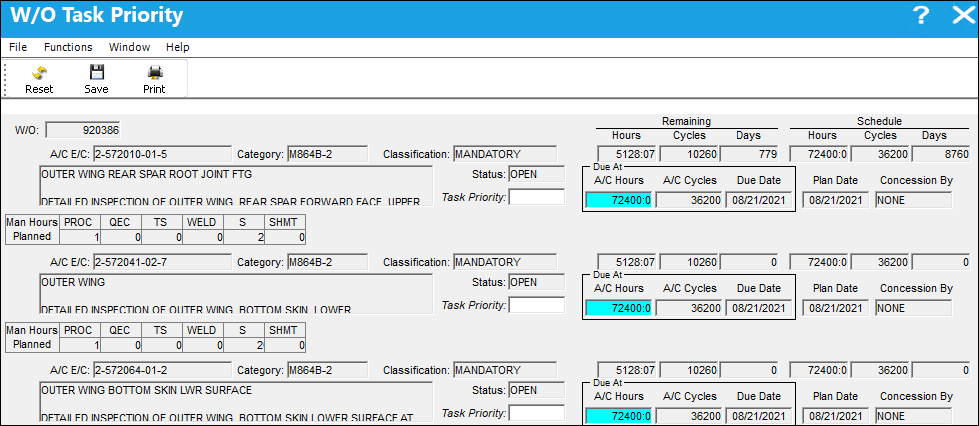
The following information/options are available in this window:
_____________________________________________________________________________________
W/O
The Work Order used to categorize, manage, and schedule work requirements for aircraft maintenance.
P/N E/C or A/C E/C or Control
P/N E/C - Part Number Engineering Control.
A/C E/C - Aircraft Engineering Control.
Control - Time Control(s) related to part (i.e. TSN, TSO, etc.).
P/N
The Part Number reference for the aircraft part.
S/N
The Serial Number for the specific serialized part.
Status
The current status of the Task Card. The status of the Task Card is helpful in determining the stage the Task Card is at with regard to it's completion. Ultimately, the completion of the Task Cards will result in the closing of the Work Order.
Task Priority
The Priority level of the scheduled task.
Remaining Hours/Cycles/Days
Planning will calculate the W/O Remaining Hours/Cycles and Days based on the time between the Planning Date and the W/O Schedule Start Date.
Schedule Hours/Cycles/Days
The Schedule Hours/Cycles/Days for the item.
A/C Hours
The Aircraft hours/cycles that the item is due at.
Due Date
The calculated due date of the item (rounded to the nearest date).
Man Hours Planned
The number of Man Hours that have been reserved/planned for the scheduled task.
 Note: The skills displayed can be controlled by ranking skills in the Skill Master. For more information, refer to the Skill Master, General Tab,via the Settings Training Manual.
_____________________________________________________________________________________
Share
Print
|
©1997-2026 Trax USA Corp. All rights reserved. This manual may not be copied, photocopied, reproduced, translated, or converted to any electronic or machine-readable form, in whole or in part, without prior written approval from Trax USA Corp. |
 |