
 Share
Share
 Print
Print
|
|
|
|
|


The Invoice/Quoted Flat Rate  button allows users to establish payment terms for the contracted work. From this window, a flat rate will be established for the contracted work in the Sell Amount field, then a breakdown of the payments that will need to be made throughout the life of the contract will be specified in the Due List button. The flat rates and payment terms can be specified for materials and labor individually.
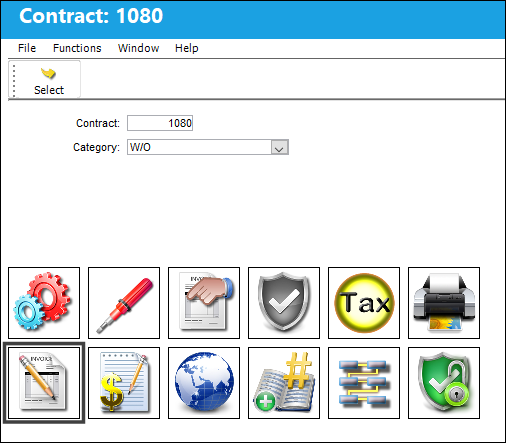
The Invoice/Quoted Flat Rate window appears.
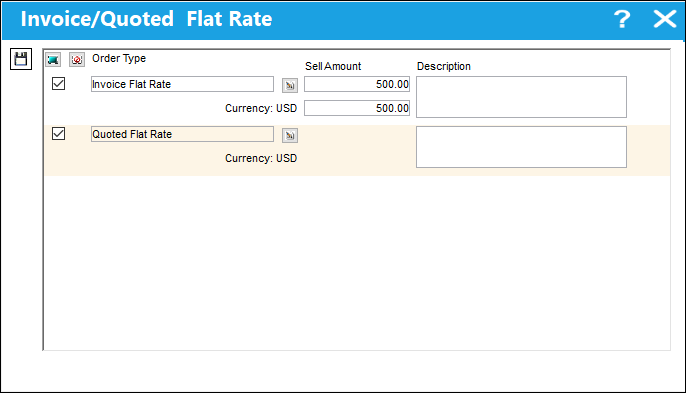
The following information/options are available in this window:
_____________________________________________________________________________________
Order Type
The type of Flat Rate to apply to the contract. The options are Invoice Flat Rate or Quoted Flat Rate.
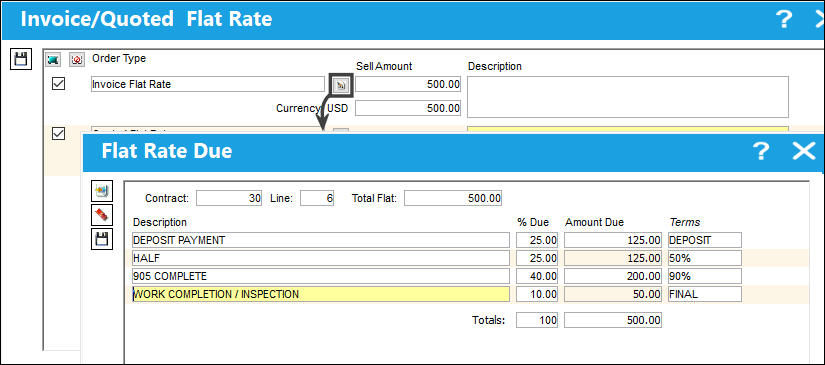
Due List  button
The Invoice Flat Rate allows a flat rate fee to be invoiced and paid in increments based on fixed breakdowns of the total fee. This functionality allows flat amounts to be paid before, during and after the Third Party work is performed. Select the Due List  button to add information such as Percentage Due and Terms. For more information refer to the Due List Button via the Production Training Manual. See below.
This button is only available for the Invoice Flat Rate option.
Sell Amount
The flat rate fee for all material or labor against the Work Order.
Description
A description of the Flat Rate being added to the contract.
Currency 
The exchange rate currency is displayed. When an amount is entered in the Currency field, the exchange rate between the main Currency and the secondary Currency is applied to the Sell Amount. For more information on the Currency selections, refer to Switches  CURRENCY and CURRENC2 via the G/L Interface Switches Manual. The Currency exchange rate is applied for each Currency in the System Transaction Code/ G/L Interface/ Currency.
_____________________________________________________________________________________
Click the Due List button to break down the payment terms. For detailed information refer to Invoice Flat Rate.
Share
Print
|
©1997-2026 Trax USA Corp. All rights reserved. This manual may not be copied, photocopied, reproduced, translated, or converted to any electronic or machine-readable form, in whole or in part, without prior written approval from Trax USA Corp. |
 |