
 Share
Share
 Print
Print
|
|
|
|
|


Select the P/N E/C  button to view or modify the engineering controls for a part. The user may also create new P/N E/Cs that may not exist in TRAX, but were complied with against Repair Order. It is very important that this information is confirmed against the Tear Down Report because P/N E/Cs dictate due dates, therefore it is imperative to review the Reset Dates in this window. If the P/N E/Cs need to be modified, this can be done via the R/O Control tab. For additional information, refer to the Receiving Inspection Detail, R/O Control tab.
This button is available from the Receiving Inspection window and within the NLA button via Order Receiving.
TRAX displays the P/N E/C Selection window:
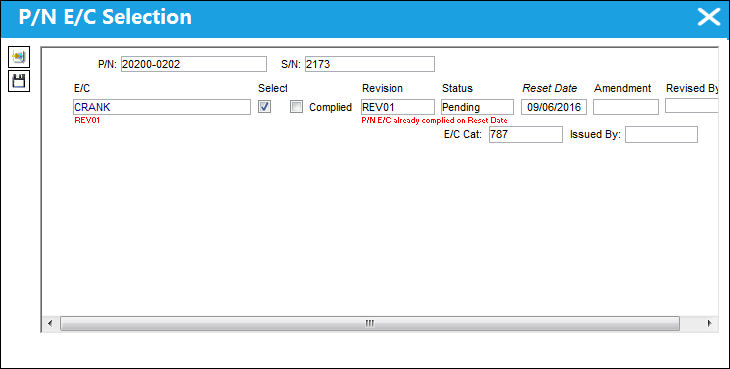
The following information/options are available in this window:
_____________________________________________________________________________________
P/N
The Part Number reference for the aircraft part.
S/N
The Serial Number for the specific serialized part.
E/C
The Engineering Control that specifies aircraft or component scheduled maintenance intervals.
Select checkbox
Click this checkbox to select the E/C.
 The Select checkbox is security controlled via Receiving/ Update/ Receiving Inspection/ P/N E/C Selection. For more information refer to the Security Explorer via the System Administration Training Manual.
Complied checkbox
Select this checkbox if the E/C has been complied.
If the Reset Date for a P/N E/C has been updated via the Receiving Inspection, R/O Control tab, and compliance has been written for a specified record, the Complied checkbox will be protected in the P/N E/C Selection window. The user can update the Reset Date from the P/N E/C Selection window; however the P/N E/C will not be complied with. This is to prevent duplicate compliance records from being written.
The Complied checkbox is security controlled via Receiving/ Update/ Receiving Inspection/ P/N E/C Selection. For more information refer to the Security Explorer via the System Administration Training Manual.
Revision
Revision number.
The Revision field, Status field is security controlled via Receiving/ Update/ Receiving Inspection/ P/N E/C Selection. For more information refer to the Security Explorer via the System Administration Training Manual.
Status
Status of the E/C.
The Status field is security controlled via Receiving/ Update/ Receiving Inspection/ P/N E/C Selection. For more information refer to the Security Explorer via the System Administration Training Manual.
Reset Date
Reset date of the E/C.
The Reset Date now defaults to the Effective Date of the E/C when receiving a Purchase Order, Exchange Order, Loan Order and during Receiving Inspection. This date will NOT default to the Effective Date for a Repair Order.
The Reset Date field is security controlled via Receiving/ Update/ Receiving Inspection/ P/N E/C Selection. For more information refer to the Security Explorer via the System Administration Training Manual.
Amendment
The amendment field normally relates to AD amendment numbers. This is alpha numeric and issued by the authority or company issuing the P/N E/C.
Revised By
The user who creates and/or authorizes the E/C revision.
_____________________________________________________________________________________
Share
Print
|
©1997-2026 Trax USA Corp. All rights reserved. This manual may not be copied, photocopied, reproduced, translated, or converted to any electronic or machine-readable form, in whole or in part, without prior written approval from Trax USA Corp. |
 |