
 Share
Share
 Print
Print
|
|
|
|
|


The Time Update  button allows the user to enter accumulated time and update time controls associated with the part. This button is available in the Receiving Inspection detail with both Switch
  RNUPDACC and Switch RNACCUPRRI set to Yes.
Upon selecting the Time Update button, the Rental Receiving Part Time Update window appears:
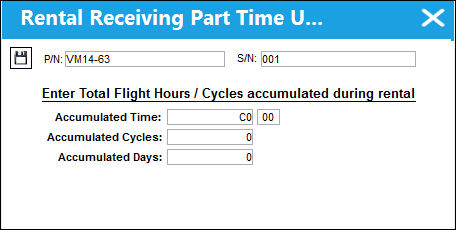
The following information/options are available in this window:
_____________________________________________________________________________________
Accumulated Time
The time accumulated during the Customer use of the P/N of the Rental Order.
Accumulated Cycles
The cycles accumulated during the Customer use of the P/N of the Rental Order.
Accumulated Days
The days accumulated during the Customer use of the P/N of the Rental Order.
_____________________________________________________________________________________
Share
Print
|
©1997-2026 Trax USA Corp. All rights reserved. This manual may not be copied, photocopied, reproduced, translated, or converted to any electronic or machine-readable form, in whole or in part, without prior written approval from Trax USA Corp. |
 |