
 Share
Share
 Print
Print
|
|
|
|
|


A 'DEPRECIATION' takes place when a component is depreciated only when a Fixed Asset Depreciation is run.
TRAX performs depreciation only via the Straight Line Depreciation Method.
The Fixed Asset Depreciation method must be performed by administrators. This option is found via G/L Interface/Update/Fixed Asset Depreciation. From that window select the Save  button. All P/Ns for the date setting will be depreciated by selecting 'OK'.
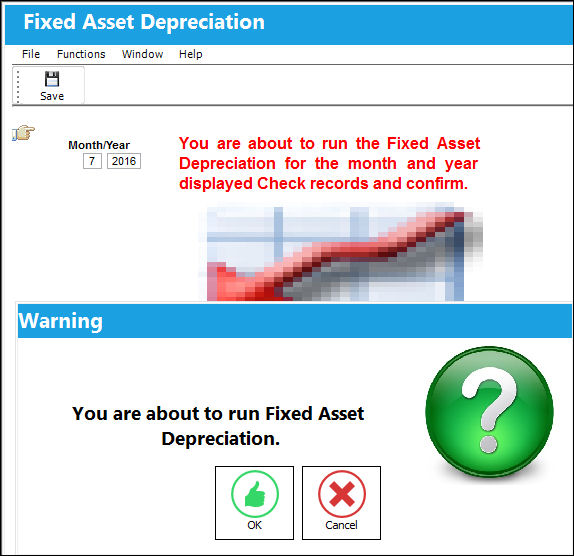
When G/L Interface Switch  COMPANYMULTI is set to 'Yes', depreciation affects all transactions generated by parent companies and their subsidized airlines. For more information regarding the multi-company functionality, refer to Switch COMPANYMULTI via the G/L Interface Switches Manual.
From the Journal Entry Detail Query window, users can see the adjustments against the G/L.
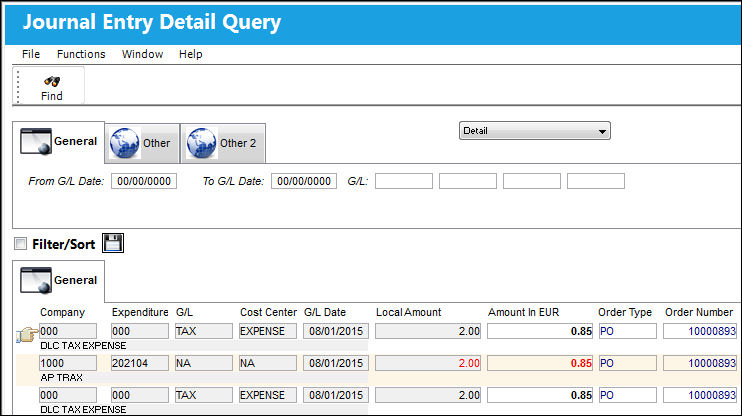
Notice the Category Codes read 'DEPRECIATION'.
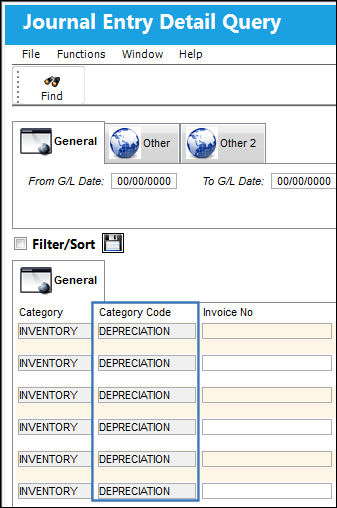
For more information regarding the depreciation of a part, refer to the topics Running Fixed Asset Depreciation and Running a Month End Closing In TRAX.
Share
Print
|
©1997-2026 Trax USA Corp. All rights reserved. This manual may not be copied, photocopied, reproduced, translated, or converted to any electronic or machine-readable form, in whole or in part, without prior written approval from Trax USA Corp. |
 |