Publication Date: 8/17/2026 Share Print

Previous Topic

Next Topic

Book Contents

Book Index

TRXDCVER - Non-visible TraxDoc TR Version

Non-visible TraxDoc TR Version

Affected Window: w_traxdoc_eu
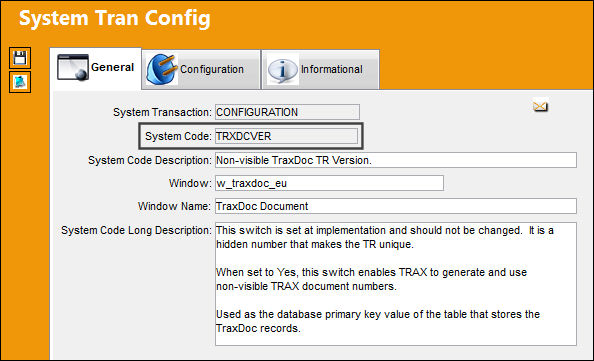
TRXDCVER_Configuration

This switch is set at implementation and should not be changed. It is a hidden number that makes the TR unique.

Note: This switch does not have Yes/No functionality.

This switch enables TRAX to generate and use non-visible TRAX document numbers.

See Also

TraxDoc Switches

ADDCONFLTR - Always add CONFLTR Code to Task Name

ADDPANGRAPH - Point Graphics for T/C Panels/Zones to Specified Repository

AMMDESIGNATORTYPE - Allow Alpha-Numeric characters in SGML Designator field of the A/C Master

AUTOXMLXSL - Automatic Import of XSL file when XML file is Loaded

BOMJOBQTY - Control the number of database jobs running for IPC Import

CHGREFDESC - Update T/C and TraxDoc Item References Descriptions with latest Revision Info

CUSWMARK - TraxDoc Custom Watermark Position

DLLFORPDFFOR - Use DLL for PDF Formatting

DOCSEQ - TraxDoc Sequence Number

DTUSETRREV - Use TraxDoc Revision Number, not TR Revision Number - NOT FUNCTIONAL

FILEMGRSORT - Allow sort by File Name instead of Line Number

MELCU_2 - MELCU With Added Functionality

MTCMMANHOURS - Do not update Man Hours if they have been altered outside the SGML

RESEQTOEND - Re-sequence non TraxDoc items when updating a TraxDoc T/C

SKIPSBEFF - Ignore SBEFF Tag When Found In AMM Manual

SORTBYGROUPSORT - Order by Group Sort value instead of alphabetically by File Name

SZTRXDOC - Limit size that can be imported in TRAXDOC

TCSFROMPROCEDURES - Create a Task Card For each procedure in the MPT787

TDSMPER - Traxdoc Item Allows to Authorization Same Person as Issued

TEXPVIEW - Override File Manager Tab

TITLESORTDOC - Sort Categories and Titles Alphabetically in TraxDoc Fleet Explorer

TRWMKS - TraxDoc TR (Temporary Revision) Custom Watermark

TRXDCFD 1 - 8 - Metafields 1 – 8

TRXDCMED - TraxDoc as Source for Task Card Manual References

TRXDCRUNPKG - Run TraxDoc OEM import through a Package or the JAR file

TRXDDBGLVL - Select the level of logging for the TraxDoc Import

TRXLOADUTF8 - Load Documents Using UTF8 Unicode

TRXRWID - Non-visible TRAX Document Number

TXCDIR - Path of TraxDoc Directory

XSDNOTINTD - Store Stylesheet in Custom Datawindow

Top of Page Publication Date: 8/17/2026 Share Print