Publication Date: 8/17/2026 Share Print

Previous Topic

Next Topic

Book Contents

Book Index

WALLPIN - PIN required at Completion step in W/O Task Card Assignment Workshop

PIN required at Completion step in W/O Task Card Assignment Workshop

Affected Window: w_wo_task_card_update_require
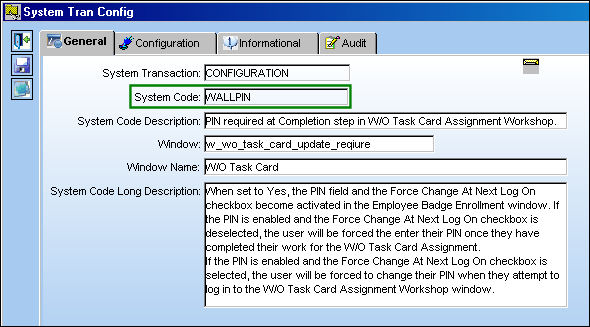
WALLPIN


Setup:

The Wall checkbox must be selected in order for Switch WALLPIN to function correctly. For additional information, refer to Control Panel via the System Administration Training Manual.
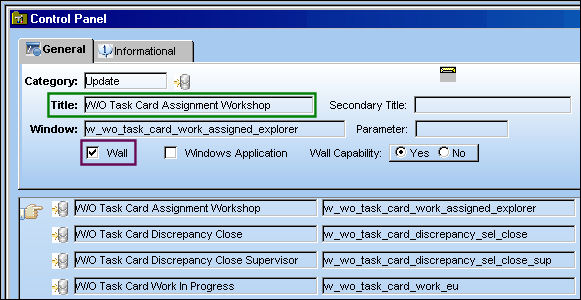
WALLPIN1


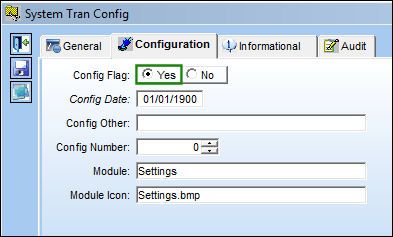
Switch Set to Yes:

When set to Yes, the PIN field and the Force Change At Next Log On checkbox become activated in the Employee Badge Enrollment window. If the PIN is enabled and the Force Change At Next Log On checkbox is deselected, the user will be forced the enter their PIN once they have completed their work for the W/O Task Card Assignment.

If the PIN is enabled and the Force Change At Next Log On checkbox is selected, the user will be forced to change their PIN when they attempt to log in to the W/O Task Card Assignment Workshop window.
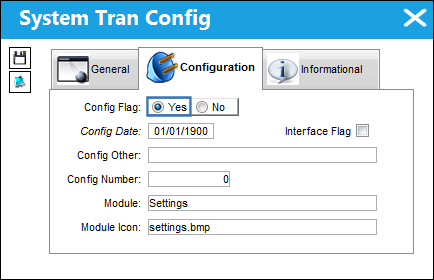
12_Settings_Yes

SET_yes


Example 1:

PIN is set up in the Employee Badge Enrollment window and Force Change At Next Log On checkbox is deselected.

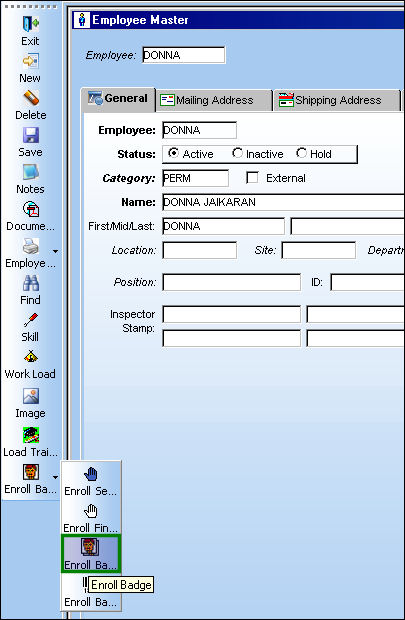
From the Employee Master window, select the Enroll Badge but_enroll_badge_small button.

WALLPIN_yes1

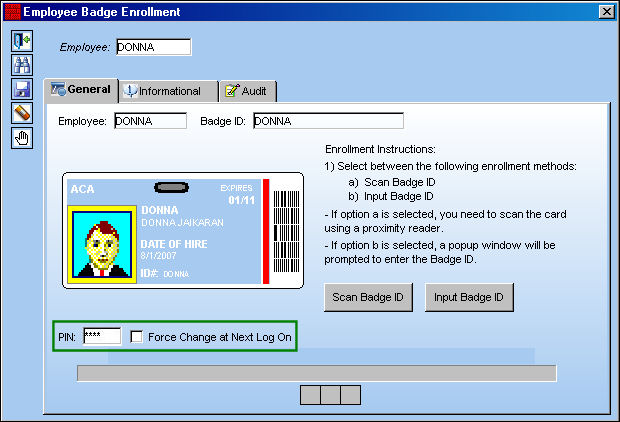
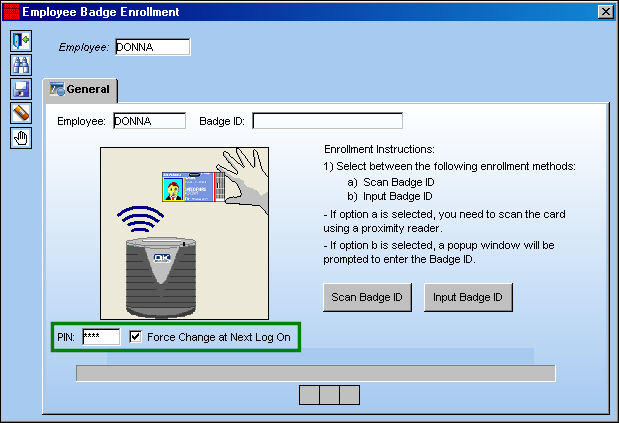
TRAX displays the Employee Badge Enrollment window.

The PIN field and the Force Change at Next Log On checkbox correctly appear in this window, because the Switch WALLPIN is set to Yes.

In the following example, the user has set up their PIN, but the Force Change at Next Log On checkbox is de-selected.

Note: Once these changes have been saved, the PIN field will become grayed out and the user will not be able to edit their PIN from this window.

Select the Save but_save_small button and exit this window.

WALLPIN_yes1a

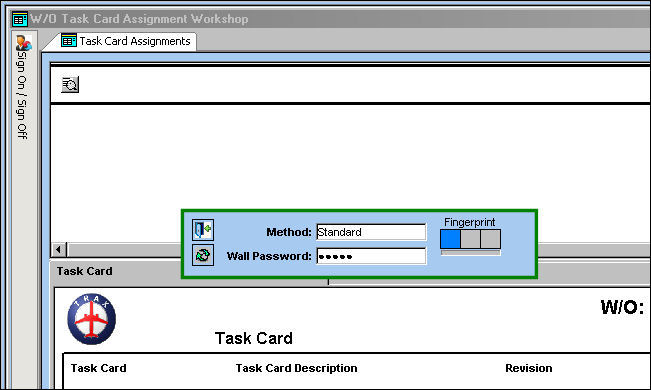
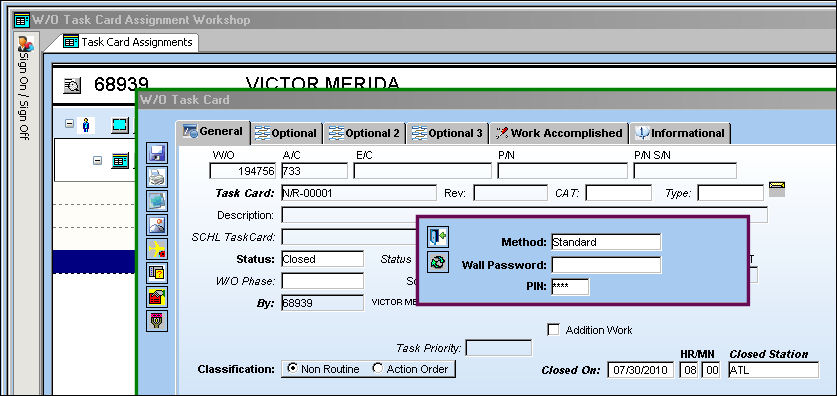
Go to Production/ Update/ W/O Task Card Assignment Workshop. Once the work is completed, the user is prompted to enter their Wall Password and their PIN.
WALLPIN_yes5


Example 2:

PIN is set up in the Employee Badge Enrollment window and Force Change At Next Log On checkbox is selected. For information regarding the Employee badge Enrollment process, refer to Employee Badge Button, via Employee Master of the Settings Training Manual.
WALLPIN_yes2

Go to Production/ Update/ W/O Task Card Assignment Workshop. Enter users Wall Password and select the Continue button.

WALLPIN_yes7

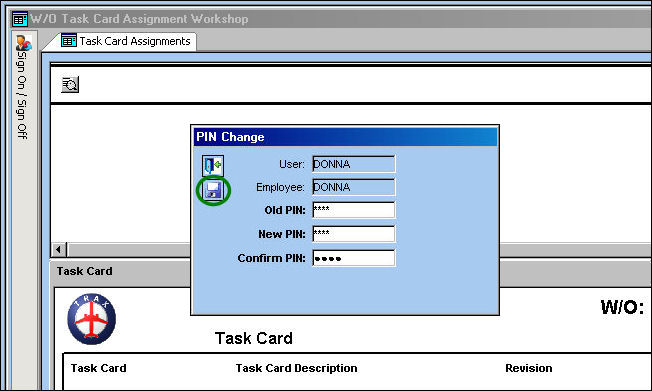
The PIN Change pop-up appears. The user is forced to change their PIN because the Force Change at Next Log On checkbox was selected in the Employee Badge Enrollment window. Enter and confirm new PIN and select the Save but_save_small button.

WALLPIN_yes3

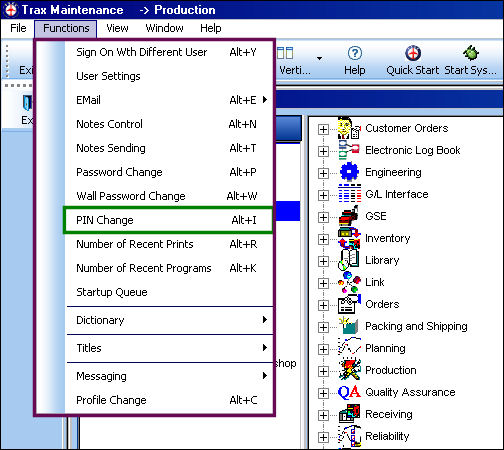
The PIN Change function can also be accessed via the Functions View of the Control Panel. For additional information, refer to PIN Change via the Functions View of the System Standards Training Manual.
WALLPIN_yes6


Switch Set to No:

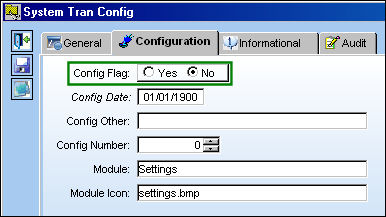
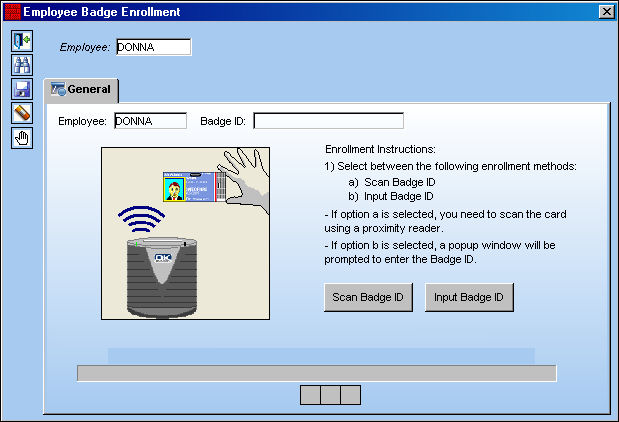
When set to No, the PIN field and the Force Change At Next Log On checkbox become de-activated in the Employee Badge Enrollment window and the Wall Password will not be activated in the W/O Task Card Assignment Workshop window. The users PIN will not be required for the Completion of the W/O Task Card Assignment.
SET_no

The PIN field and the Force Change At Next Log On checkbox do not appear in the Employee Badge Enrollment window as shown below.
WALLPIN_no1

See Also

Settings Switches

ACCATALOG - A/C Catalog Configuration

ACETOPSMAN - A/C Master ETOPS Control Mandatory System Wide

ACFIELDS - A/C Master Make Line No. and Variable Engineering No. (fields) Mandatory

ACTIONPRIORITY - ROS Action Code Priority

ATATYPESER - A/C Type/Series ATA Specification Applicability

AUTOAUTHPNSWCONF - Auto authorize P/N Software Configuration

BINCATLINKPNCAT - Bin Category in Bin Master linked to P/N Category

CHOMITPN - Characters to Omit in TRAX P/N

CONSTRAINTCODETAB - Display Constraint Code Tab

CRYPTPASS - Personal Data Encryption

CUSTOMNOTIFIC - Customize Recurrent Items Alert Notifications

DEPMNTMD - Make Depreciation Month or Code Mandatory for Rotable and Repairable Parts

DOTNETPFDFJOIN - .NET Framework PDF concatenation

EMAILPN - P/N Interchangeable, Send E-Mail for All Transactions

EMOBIOSDEBUG - Controls the Use of Crashlytics for Non-Prod Target IPAS for iOS Debugging Purposes

ETOPSRECNOTIF - Display ETOPS Notification in Extended Format

EXCELRANGELOGIC - (No Longer in Use)

FINSYSCT - Vendor Master Make Financial Sys Country (field) Mandatory

FINSYSSITE - Vendor Master Make Financial Sys Site Code (field) Mandatory

FINSYSVEND - Vendor Master Make Financial Sys Country (field) Mandatory

GRAVELCONTROL - Gravel Ratio applied for Aircraft Landing on an Unpaved Runway

I_EMPDEPARTMENT - Employee Department

I_EMPDEPDIVISION - Employee Division

I_EMPDEPSECTION - Employee Department Section

I_EMPPOS - Employee Position

I_ENAML - Employee Name

IPNCTRLOVERWRITE - Override P/N Master Control

JAVAHEAP - Allows User to Set the Maximum Java Heap Size in MB

KFACTROL - Carrying Cost Factor for EOQ Calculation

LOCKDEFAULTLOGIN - Default Login Method Set in INI File

LOCVEND - Vendor Location (field) Mandatory

MAXSKILLRANK - Set a Maximum Number of Skills to be ranked

MELVIAREV - Update MEL Via Revision

NWPNAUTH - New P/N to Authorization

OEWUPD - Operating Empty Weight Auto Update

OLDPDFJOIN - Revert to Septimo 3-style PDF concatenation

New Topic (33)

ONSTPAUTH - One Step Authorization for P/N

OVRPREFERVEN - Override Preferred Vendor When Manufacturer is Updated

PNACCONF - Display Hard Warning Message Upon Deletion of P/N A/C Configuration

PNCATCHN - Allow P/N Category Change without Validation of the Invoice Status

PNDNTSHW - P/N Control Do Not Cascade Show On Report Checkboxes

PNINMFMN - P/N Interchangeable Make Manufacturer (field) Mandatory

PNSOFTAUTH - P/N Software to Authorization

PNSOFTEC - Control Software Configuration via P/N Software and SLID

PNVENDPOPREF - Multiple P/N Vendors Cannot be Preferred and Have Same Condition

PNVENDROAUTLOC - Auto R/O By Location

PNVENDROPREF - Only Allow One Preferred Vendor for P/N Repair Capability

PN_NHA_EFF - Enable P/N NHA Effectivity Validation

PRINTBARCODE - Print Barcode Scan Interface Sequence and Flag

PROCONTLNHA - Update Prorated Control Initial Times at Schedule Change

RANDOMBIN - (No Longer in Use)

REOREQ_1 - Inventory Levels of min/max/reorder of 1/1/1. Reorder Qty of 1

RFACTROL - Replenishment Cost Factor for EOQ Calculation

RSTROREPCD - Links Auto Reset on R/O to Repair Code

SHLFRMV - Remove Shelf Life Expiration

SKILLDEFECT - Allow the Exclusion of Certain Skills from Appearing in the Skills

SSVIAFV - System Ship Via From Vendor Instead of Tran Code

SUBLOCATION - Allow Sub Locations On A Location For Grouping Inventory Reordering

SUPERSEDPN - Superseded By Interchangeable Validation

SYSTRANCDBUF - Use System Category Edit Buffer Control

VALIDATENUMERIC - Validate Numeric Range Logic

VALLICDATE - Validate License Date

VATMNDTRY - Vendor Master Make V.A.T. (field) Mandatory

VATVALIDATE - Validate V.A.T. in Vendor Master window

VNDPRCTCATOF - Protect Vendor Q/A Checkboxes

WOCONSUMBC - Enables/Disables Barcode in W/O Control Summary Print

Top of Page Publication Date: 8/17/2026 Share Print