Publication Date: 8/17/2026 Share Print

Previous Topic

Next Topic

Book Contents

Book Index

P/N Interchangeable Button, via Standard Buttons

logo_11_small button edited

When selecting a part number, the user may select the Interchangeable but_interchangeable_small button to view and select any both-way interchangeable parts associated to the Main P/N.

From the following drop down selection menu, select the Interchangeable but_interchangeable_small button to the left of the Main P/N.

Note: This option is system wide where ever part number selection applies.
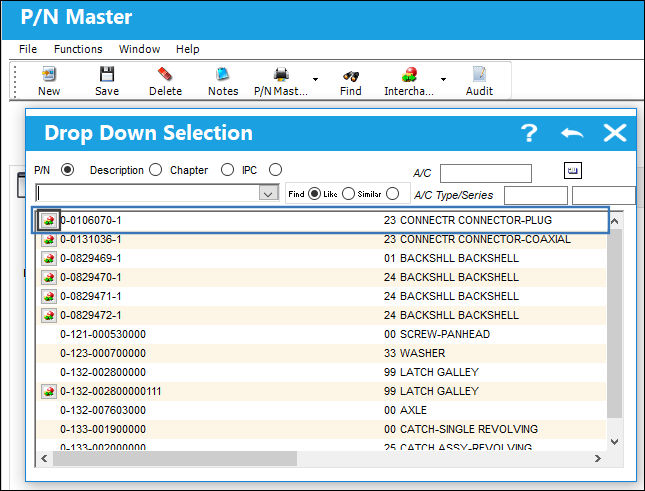
15 PN Interchangeable Button, via Standard Buttons (1)

The P/N Interchangeable window appears displaying all of the interchangeable parts for the Main P/N. Select one of the interchangeable parts.
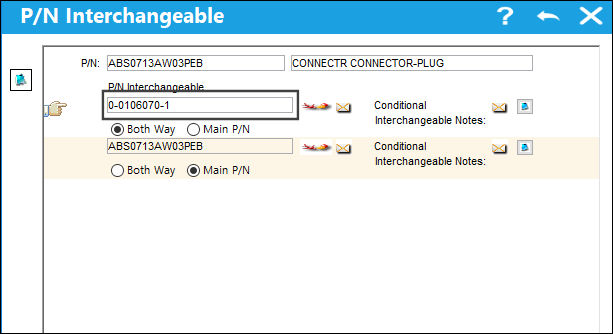
15 PN Interchangeable Button, via Standard Buttons (2)

The interchangeable part is populated as shown below:
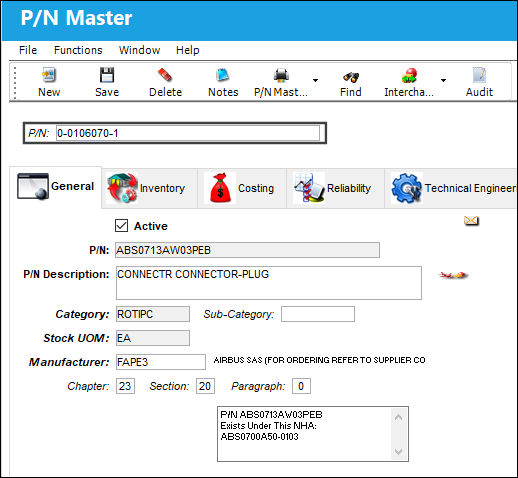
15 PN Interchangeable Button, via Standard Buttons (3)

See Also

Standard Buttons

Audit Button, via the Standard Buttons

Audit Button [pre-11], via Standard Buttons

Auto S/N Button, via Standard Buttons

AWB/Expedite Button, via the Standard Buttons

Delete Button, via Standard Buttons

Document Control Button, via Standard Buttons

Effectivity Button, via Standard Buttons

Effectivity Button [pre-11], via Standard Buttons

E-mail Button, via Standard Buttons

Exit Button [TRAX 11]

Exit Button [pre-11], via Standard Buttons

Find Button, via Standard Buttons

Image Button, via Standard Buttons

Import Button, via Standard Buttons

Information Button, via Standard Buttons

New Button, via Standard Buttons

Notes Button, via Standard Buttons

One Way Interchangeable Button, via Standard Buttons

Print Button, via Standard Buttons

Reset Button, via Standard Buttons

Save As Excel Button, via Standard Buttons

Save Button, via Standard Buttons

Spelling Button, via Standard Buttons

Select All/Deselect All Button, via Standard Buttons

Top of Page Publication Date: 8/17/2026 Share Print