
 Share
Share
 Print
Print
|
|
|
|
|


Effectivity Button, via Standard Buttons

The A/C Effectivity button is a standard button found throughout the system. The following is just one example of the A/C Effectivity button as displayed in TRAX Version 11 and all later releases of TRAX.
Select the A/C Effectivity button to apply A/C Effectivity to the selected part from the P/N Master (also available in other TRAX windows in query mode). Assigning aircraft effectivity to parts is needed, for example, in order to be allowed to install parts only on those aircraft they are effective to. A part's A/C Effectivity is a vital configuration that affects multiple types of transactions throughout TRAX.
When the button is selected, the P/N Effectivity appears as follows.
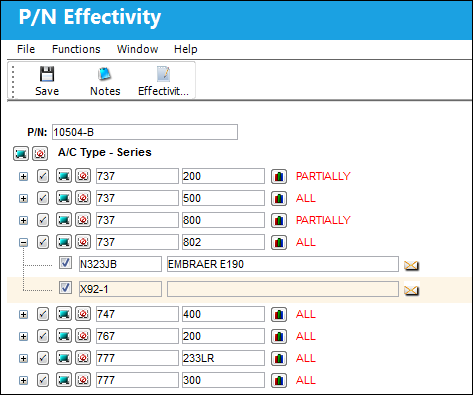
The layout and functionality of this window has been modified in TRAX VERSION 11 and all later releases. Notice that effectivity can be applied to entire fleets and/or individual aircraft all from the same window. The Override button is no longer required to apply individual aircraft effectivity in TRAX VERSION 11. For information on the previous layout, refer to the Effectivity Button, via Standard Buttons.
The following information/options are available in this window:
_____________________________________________________________________________________
P/N
The Part Number that is having its aircraft effectivity updated.
Fleet Select All  / Deselect All
  buttons
Use these buttons to select all fleets (including every aircraft) or to deselect all fleets.
A/C Type/Series
The entire aircraft fleet. An entire fleet can be selected for effectivity by selecting the A/C Type/Seriescheckbox or individual aircraft from that fleet can be selected by selecting the Expand  / Collapse
  buttons.
A/C Type/Series  button
Select this button to add effectivity to the entire fleet.
Expand / Collapse buttons
Use these buttons to view all of a fleet's aircraft or to hide all of a fleet's aircraft. Once expanded, individual aircraft can be selected or deselected for effectivity.
Aircraft Select All / Deselect All buttons
Use these buttons to select all of a fleet's aircraft or to deselect all of a fleet's aircraft. The part will be effective to only those selected aircraft.
P/N Range  button
Select this button to apply effectivity to a range of specified S/N Line items or to a range of IPCs. For additional information, refer to the P/N Range Button, via the P/N Master Buttons of the Settings Training Manual.
ALL
Indicates that all aircraft for the selected type/series are effective. If only one available Type/series is selected, but all of the aircraft within that type/series are selected, the effectivity is classified as ‘ALL.’
PARTIALLY
Indicates that some but not all aircraft for the selected type/series are effective. If multiple type/series are selected, but one of the selected type/series has aircraft within that are not selected, the effectivity is classified as ‘Partially.’
Select checkbox
Select this checkbox if the P/N is to be effective to this aircraft. Only those aircraft with this checkbox selected will have effectivity.
Aircraft
The individual aircraft that make up the fleet.
_____________________________________________________________________________________
The Override checkboxes are no longer used in TRAX VERSION 11. Instead, all of a fleet's aircraft are listed in the same window.
Select the fleet type/series applicable.
To select only specific Tail Numbers within a fleet Type/Series, select the fleet's Expand button and then select the applicable Tail Numbers. If a part is not effective to an aircraft, it cannot be issued to a Work Order for that aircraft. However, if the Work Order is for a third party, there are no effectivity checks on the part issues.
Share
Print
|
©1997-2026 Trax USA Corp. All rights reserved. This manual may not be copied, photocopied, reproduced, translated, or converted to any electronic or machine-readable form, in whole or in part, without prior written approval from Trax USA Corp. |
 |