
 Share
Share
 Print
Print
|
|
|
|
|


One Way Interchangeable Button, via Standard Buttons

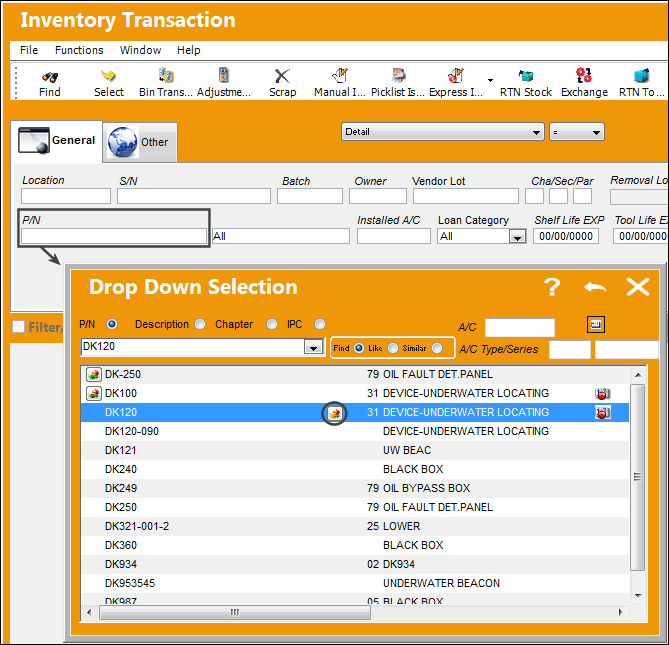
When selecting a Part Number, users may select the One Way Interchangeable  button to view and select any one-way forward interchangeable parts associated to the main P/N.
From the following drop down selection menu, select the One Way Interchangeable button to the right of the Main P/N.
This option is system wide where ever Part Number selection applies.
One Way Interchangeability implies that if Part B is One Way Forward From Part A, for every transaction that can include Part A, Part B can be used. However, for every transaction that can include Part B, only Part B can be applied, not Part A. If you query the stock on Part A, the system will show you Part B also. If you request Part A on a Picklist, the system may give you Part B instead. For more information refer to the One Way Interchangeable Button via the P/N Master in the Settings Training Manual.
The One Way Interchangeable window appears displaying all of the one way parts for the Main P/N. Double-click on one of them.
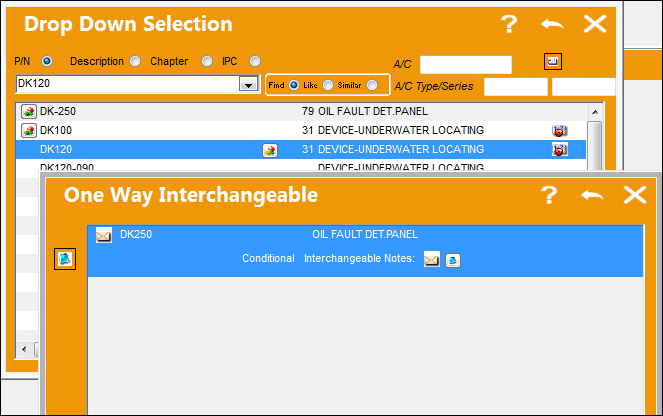
In TRAX versions prior to 11.5, the One Way Interchangeable button is informational only - the One Way part cannot be selected.
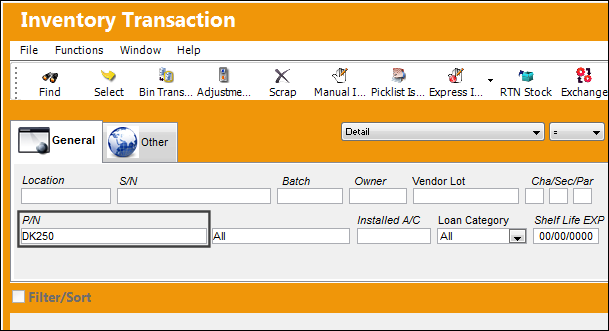
The One Way Interchangeable part is populated in the P/N field as shown below:
Share
Print
|
©1997-2026 Trax USA Corp. All rights reserved. This manual may not be copied, photocopied, reproduced, translated, or converted to any electronic or machine-readable form, in whole or in part, without prior written approval from Trax USA Corp. |
 |