
 Share
Share
 Print
Print
|
|
|
|
|


Information Button, via Standard Buttons
From the drop down selection window for several fields in TRAX, the Information button can be selected to display additional information for the selected option. The information displayed is from that field's entry in its pertinent Settings Master window.
This button is only functional for the following fields: Location, Customer, Employee, and Vendor. Anywhere in TRAX that these fields are available, the Information button will also be functional.
For example, right-click on the Location field (from any window in TRAX). Click on a Location.
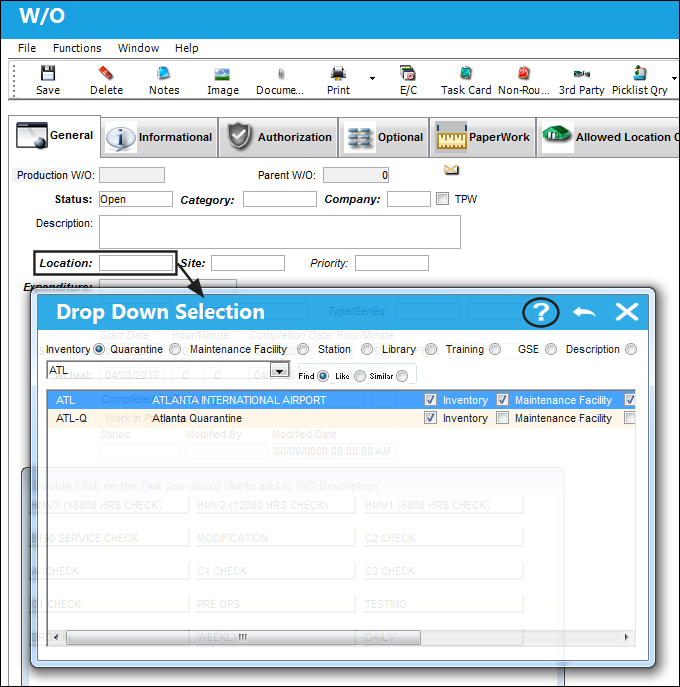
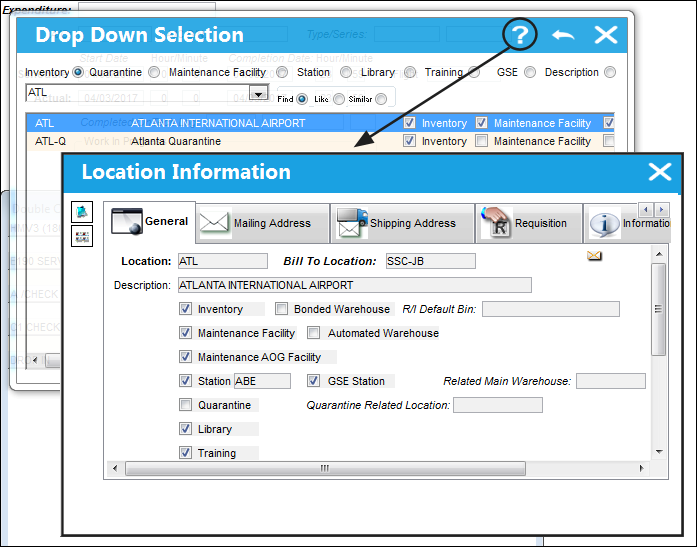
Before making a selection, users can click on a Location and select the Information button. Once selected, the Location Information window pops up in query mode. All of the information that is available from the Location Master for the selected record is displayed.
Share
Print
|
©1997-2026 Trax USA Corp. All rights reserved. This manual may not be copied, photocopied, reproduced, translated, or converted to any electronic or machine-readable form, in whole or in part, without prior written approval from Trax USA Corp. |
 |