
 Share
Share
 Print
Print
|
|
|
|
|


Display Format Selection
The display format selection allows users to choose between a number of different display formats for queries and reports. They can be selected from the drop down window which is normally located at the top left of the screen.
The following example is from an Inventory window. This window will normally default to the last display format used. If the user requires to see the detail format for this window, select the Detail option from the drop down menu. The window will automatically change the display format and the selection criteria.
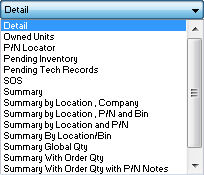
Different formats can have different selection criteria according to the requirement.
Share
Print
|
©1997-2026 Trax USA Corp. All rights reserved. This manual may not be copied, photocopied, reproduced, translated, or converted to any electronic or machine-readable form, in whole or in part, without prior written approval from Trax USA Corp. |
 |