
 Share
Share
 Print
Print
|
|
|
|
|


Pop-Up Calendar
The Pop-Up Calendar can be used anywhere that a date field is described in italics (Date).
Move the cursor into the field and right click. The calendar should appear as follows:
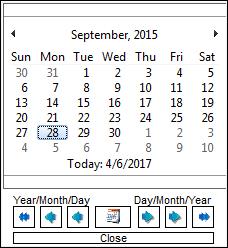
At the top, the month and year are displayed.
The arrows to the left and right of the month/year will move the month forward and backwards one month at a time.
The abbreviated days of the week (in English) display under the month/year starting with (S)unday and ending with (S)aturday.
The number of days in the month are under the days of the week. The current day selected is highlighted.
Under the days are the calendar scroll buttons. The blue buttons on the left will scroll the date backwards by year/month/day. The red buttons on the right will scroll the date forwards by year/month/day.
The Calendar button in the middle will re-position the calendar back to today’s date
To select a date and return to the original display, double click on the day. This will be highlighted.
To exit without selecting a date, click on the X at the top right of the window.
Share
Print
|
©1997-2026 Trax USA Corp. All rights reserved. This manual may not be copied, photocopied, reproduced, translated, or converted to any electronic or machine-readable form, in whole or in part, without prior written approval from Trax USA Corp. |
 |