
 Share
Share
 Print
Print
|
|
|
|
|


TRAX Notes Control
The Notes Control option allows for the management of all notes in the system.
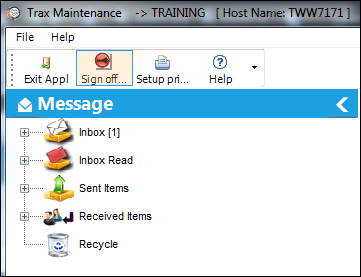
Notes are managed via the Message Central tab in the TRAX Control Panel Explorer. From this window, the user may view and manage notes.
_____________________________________________________________________________________
Inbox
Contains all new unread notes that have been sent to the user.
Inbox Read
Shows all of the read notes.
Sent Items
Contains all of the Notes that were sent by the user.
Received Items
Stores all of the notes received by other users.
Recycle
Stores all deleted notes.
_____________________________________________________________________________________
Notes can be created in text format and then attached to almost any transaction or item in the system anywhere. The Note  button appears on individual screens, and also on the system toolbar at the top of the screen. An additional function it can perform is similar to a TRAX internal e-mail. Notes can be sent to users as required. Some system functions will automatically send notes to the users.
Share
Print
|
©1997-2026 Trax USA Corp. All rights reserved. This manual may not be copied, photocopied, reproduced, translated, or converted to any electronic or machine-readable form, in whole or in part, without prior written approval from Trax USA Corp. |
 |