
 Share
Share
 Print
Print
|
|
|
|
|


Sort Data
Most of the screens in the system that display multiple lines of data have special functions that can be accessed by right-clicking over the items on the display. These functions allow temporary ad-hoc sorting and filtering of data according to the user's requirements. These functions apply to print windows, queries, and data windows. The combinations of filters that can be applied to the reports and queries are unlimited. After right-clicking on the mouse, the following context menu will appear.
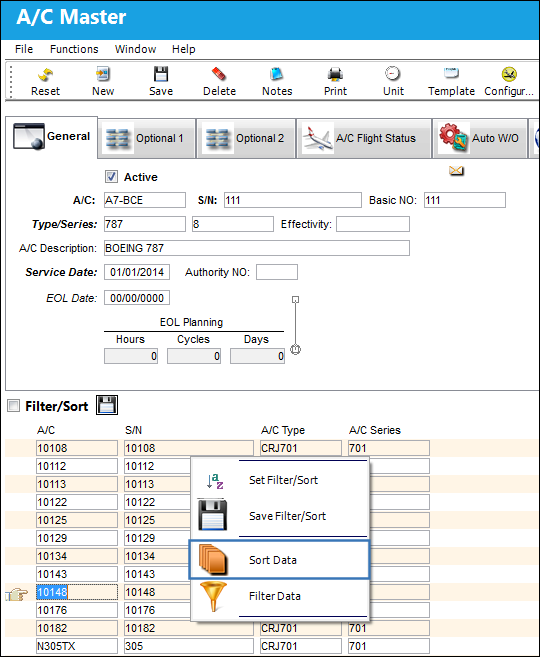
Use the mouse to select the option required.
Depending on your selection the following screens will appear.
Example: If a display were sorted by batch number and the user would like it to be temporarily sorted by bin, the user can change the sort order dynamically.
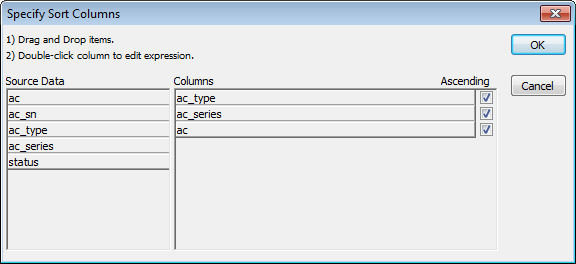
The column to the left shows all the fields that are available to sort the data by. Click on the field and hold down the mouse button. Drag the field to the right over the Columns section and release the mouse button. The field should remain in the right hand column. If the user clicks on OK now, the Sort window will close and the display will show the user the data sorted in the specified order.
It is possible to have many sort orders. Simply drag and drop each one that is required. If the user would like to remove a sort selection, drag it from the right column back to the left column. If the user wishes to change the sort order from ascending (i.e. 123, ABC) to descending (i.e. ZYX, 321), click on the checkbox to the right of the field name (under the ascending description).
Share
Print
|
©1997-2026 Trax USA Corp. All rights reserved. This manual may not be copied, photocopied, reproduced, translated, or converted to any electronic or machine-readable form, in whole or in part, without prior written approval from Trax USA Corp. |
 |