Publication Date: 8/17/2026 Share Print

Previous Topic

Next Topic

Book Contents

Book Index

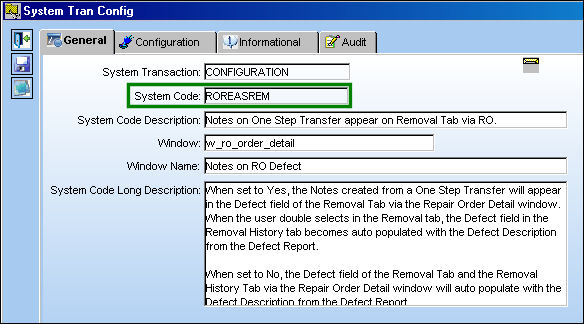
ROREASREM - Notes on One Step Transfer appear on Removal Tab via RO

Notes on One Step Transfer appear on Removal Tab via RO

Affected Window: w_ro_order_detail
ROREASREM

Note: Switch ADDLSTAC and Switch ROAURMV must both be set to Yes for switch ROREASREM to function correctly.


Setup:

The following Defect Report is created. Note the Defect Description.
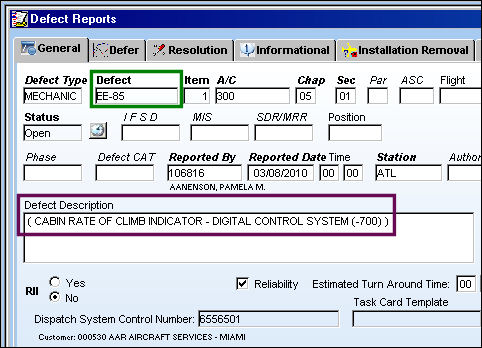
ROREASREM_no1


Switch Set to No:

When set to No, the Defect field of the Removal Tab and the Removal History Tab via the Repair Order Detail window will auto populate with the Defect Description from the Defect Report.

The following transaction is completed for P/N 0070N1.
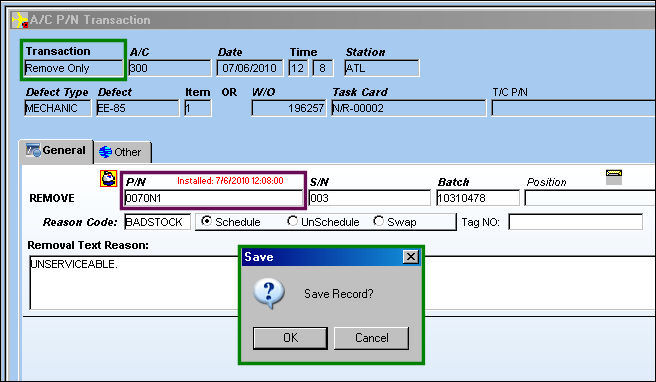
ROREASREM_no2

Go to Inventory Transaction and select the Return to Stock but_RTNStock_sm button. TRAX displays the Return To Stock window. Populate the highlighted information (green).
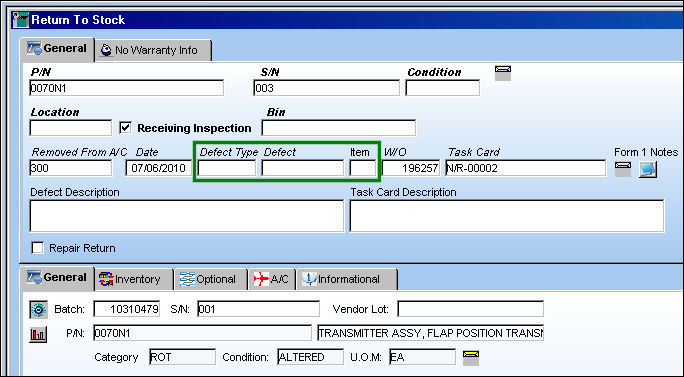
ROREASREM_no3

Once the Defect information is populated, the Defect Description auto populates. Select the Save but_save_small button. The Save prompt appears. Select 'OK.'
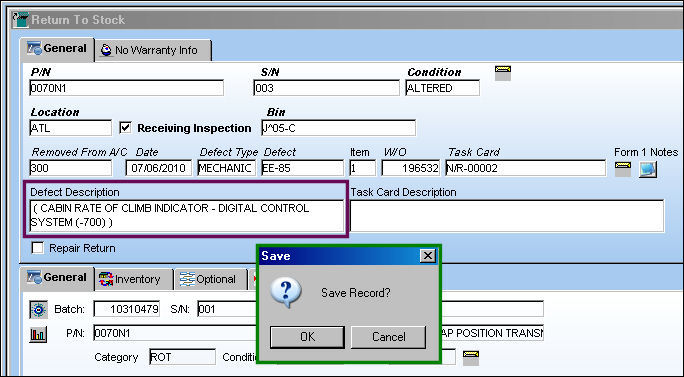
ROREASREM_no4

Go to Orders/Update/Repair Order.

Create a RO for the following P/N. Select the Save but_save_small button. The Save prompt appears. Select 'OK.'
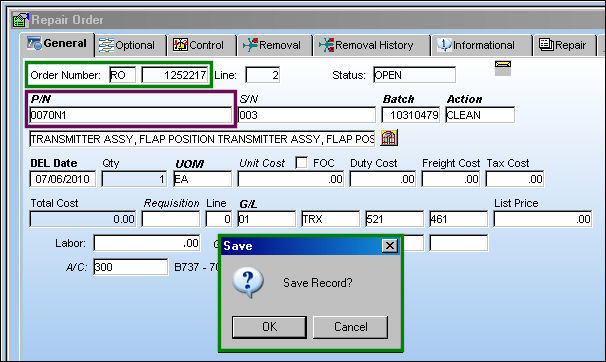
ROREASREM_no5

Go to the Removal tab. The Defect Description from the Defect Report auto-populates in the Defect field.
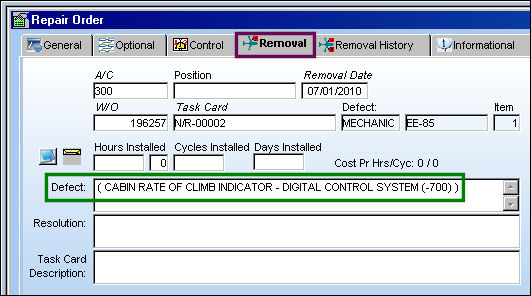
ROREASREM_no6

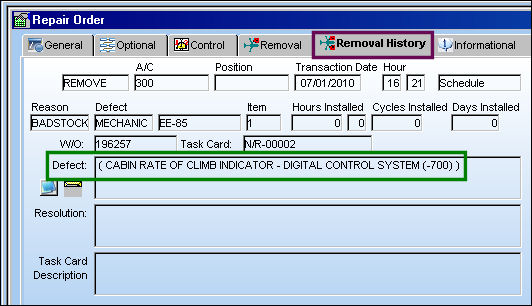
Go to the Removal History tab. The Defect Description from the Defect Report also auto-populates in the Defect field.
ROREASREM_no12


Switch Set to Yes:

When set to Yes, the Notes created from a One Step Transfer will appear in the Defect field of the Removal Tab via the Repair Order Detail window. When the user double selects in the Removal tab, the Defect field in the Removal History tab becomes auto populated with the Defect Description from the Defect Report.

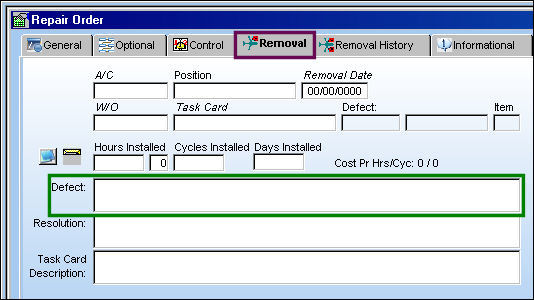
The Removal tab via the Repair Order Detail appears blank, as shown below.
ROREASREM_no13

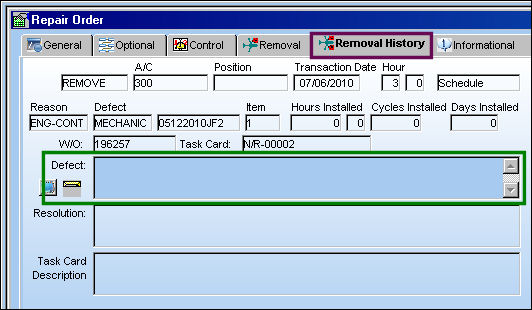
The Removal History tab via the Repair Order Detail appears blank, as shown below.
ROREASREM_no7

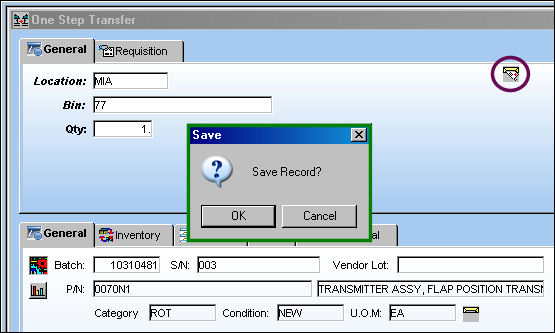
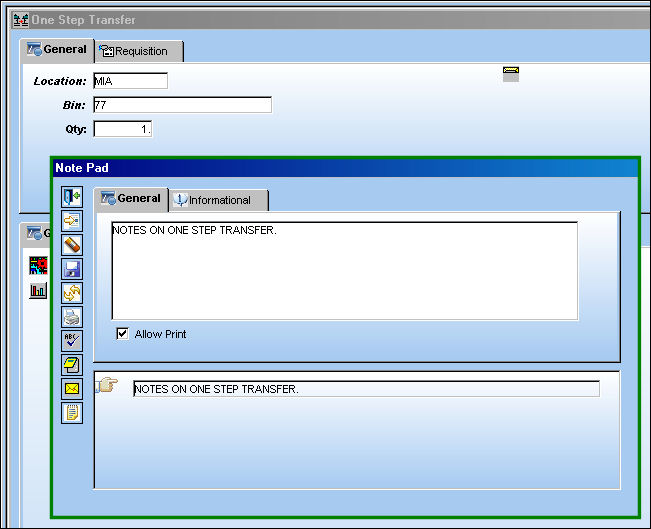
Perform a One Step Transfer and add a note.
ROREASREM_no9

Select the Save but_save_small button. The Save prompt appears. Select 'OK.'

Note the Notification but_notification_small icon.

ROREASREM_no10

Go to the Repair Order Detail, Removal tab. The text within the note appears in the Defect field. Double select in the Repair Order Detail, Removal tab.
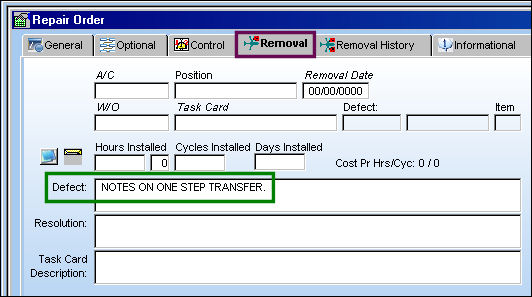
ROREASREM_no11

Select the Repair Order Detail, Removal History tab. The Defect Description from the Defect Report auto populates in the Defect field.

ROREASREM_no12

See Also

Orders Switches

ADDLSTAC - Add Last A/C P/N Transaction To The R/O

ADDLSTACEX - Add Last A/C P/N Transaction an E/X in AeroComponent Service

ALWPRTISSE - Allow User Defined Quantities for Auto Issue of Purchase Order

ASSFOL - N/L/A Follows Parts On Repair Orders

AUTOMESSAGELOAD - Send Message Load messages Automatically upon receiving Order Completion Message

AUTOROS - ROS Auto Repair Orders Sent to Vendor

AUTREQWTP - Auto Populate W/O and Task Card information from Requisition in the PO

AXTRNTYP - Aeroxchange Transaction Type

BILLTO - Order Bill To Functions

BOOKTO - Repair Order Book To (Radio Button) Selected By Default

CAPEXGL - Capital Expenditure Default G/L

CATROWO - R/O Category Not Required if R/O Header Has Work Order

CHKLIFEFLG - Check for Shelf and Tool Life Expiration

COCAPEX - Contract Order Capital Expenditure field Mandatory

COMATDASHBOARD - Refresh Time of Comat Flight Dashboard

EOSINSTALLDETAIL - Show installation of P/N S/N that replaces the exchange sent P/N S/N or show original installation detail of the exchange sent P/N S/N

CONTBLOC - Contract Order Loaded By Location

COPOREORAUT - P/O Authorization Status For Reorder Contract Order

CUSTOMSSEQ - Next Sequential Number for a Customs Record

DEFDESREMREA - Removal Reason added to Defect field of Repair Order Detail, Removal Tab

EXCAPEX - E/X Capital Expenditure (field) Mandatory

EXCATMAN - E/X Category Mandatory

EXCVTGL - Convert R/O to E/X G/L Defaults to P/N R/O G/L

EXDESCRIPTION - Exchange Order Line Item P/N Description (field) Mandatory

EXPRICECHANGEAUTH - Closed E/X Price Change Authorization Required based on Authorized Spend Limit

EXREQRQ - Exchange Order Requisition Required For Each Line

EXTOPOLINE - Retain the Order Line when converting from an Exchange Order to a Purchase Order

GREYACTIONRO - Grey Out Action Field Once The Repair Order Is Saved

HIDEORDERGRAPH - Hide the Graphs Section in the Order Header Windows

LINKDOCRO - Repair Order linked to Engineering Control's Attachments

LOANDAY - Loan Order Number Of Days To Allow For Packing And Shipping

LOCAPEX - Loan Order Capital Expenditure (field) Mandatory

LOCATMAN - Loan Order Category (field) Mandatory

LODESCRIPTION - Loan Order Line Item P/N Description (field) Mandatory

LOPRICECHANGEAUTH - Closed L/O Price Change Authorization Required based on Authorized Spend Limit

LOREQRQ - Loan Order Requisition Required For Each Line

LOTOEXLINE - Retain the Order Line when converting a Loan Order to Exchange Order

LOTOPOLINE - Retain the Order Line when converting a Loan Order to Purchase Order

MANUTRANS - Use Spec2K ROS Transmission Code as the Manufacturer Code in Spec2K/ROS messages

NOAUTOEXFORADV - Auto Exchange Order Not Created if Non-fulfilled Advanced E/X Exists for Part

NOCANCELORD - No Status Change or Notification when Exception Order is Received by Customer with QTY=0

OPTION1 - Material Certification With Full Traceability To Original Equipment Manufacturer (OEM) or Airline Required

OPTION2 - JAA or FAA Certification Required

OPTION3 - Tear Down Report Must Accompany Shipment

OPTION4 - Repair Estimate Must Be Approved Prior To Accomplishing Repair or Not

OPTIONFT - Switch's System Code Description Field Polulates Order Print's Footer

ORCAPEXSP - Capital Expenditure Drop Down Selection Suppressed

ORDADDOVRCHK - Automatically Flag the Override Address checkbox on All Orders

ORDAWBTRIAGE - Display the AWB Triage field on the Order AWB Window and Show Soft Warning

ORDBILL - (No Longer in Use)

ORDERAUTHBYEMAIL - Enable the Order Authorization by Email

ORDERAUTOVR - Standard Order Authorization Override

ORDERDFT - Orders Duty, Freight and Tax Display (fields) disabled

ORDERDUT - Enable Duty Cost field

ORDERGLSEL - Protect G/L and allow selection only of G/L account with same G/L Value

ORDERMCURR - Currency field Protected in Orders

ORDERTAX - Orders Tax Display

ORDUNFIL - Order Unfulfilled Icon in Supervisor

ORDWARR - Warning For Order Warranty

ORECMSG - Orders E/C Notification

PBHSEQ - Power By The Hour Seq

PNNOTSOFT - Allow Software Load During A/C P/N Transaction and A/C Initial P/N Load

PNOTESPONLY - Only Display P/O Notes via the P/O Detail P/N Notes Tab

PNREFCST - Update P/N Reference Cost Based on P/O Unit Cost

PNUSAGEALLLOCATION - Show P/N Usage For Locations

POCAPEX - Purchase Order Capital Expenditure field Mandatory

POCATMAN - Purchase Order Category Mandatory

PODESCRIPTION - Purchase Order Line Item P/N Description (field) Mandatory

POGLDFCL - Do Not Auto Populate Inventory G/L On A Purchase Order

POIMPORTNORCV - P/O Not Automatically Received through Vendor P/O Data Import

POIMPORTNOTAUTH - P/O Not Automatically Authorized through Vendor P/O Data Import

POLINE1 - Purchase Orders Can Only Have One Line Item

POLINE1SPEC2K - Purchase Orders Can Only Have 1 Line Item for Spec2000 Vendors

POMINQTY - Validate Order Levels With Less Than Minimum ORD QTY

POPRICECHANGEAUTH - Closed P/O Price Change Authorization Required based on Authorized Spend Limit

PORCVAU - Do Not Allow Unauthorized P/Os To Be Received

POREQRQ - Requisition Field Mandatory for Purchase Order

POSEQ - Purchase Orders Next Sequence Number

POTOEXLINE - Retain the Order Line when converting a Purchase Order to Exchange Order

PRECAFTRO - Print Engineering Individual Detail After the Repair Order

PRINTALLDO - Print Document Control from Receiving Inspection and Order Receiving

RECLINKDISCST - Display Close Order Discrepancy Pop Up Upon Receiving An Order

REQAUTRQ - Validate for Authorization When Attaching a Requisition

REVALINV - Revalidate the Invoice at Order Receiving

REVALINVRI - Revalidates the Invoice at R/I

RLAUTORD - Send Order for Authorization if Mandatory Field on Header is Changed

ROADDDOC - Repair Order Print with Attached Documents

ROADDGL2 - Default R/O GL 2 values auto-populate on Repair Order creation

ROAURMV - (No Longer in Use)

ROAUTLCK - Repair Orders That Have Been Authorized Cannot Be Edited Without Unlock Button

ROAUWAR - Repair Order Auto Warranty Claim

ROCAPEX - Repair Order Capital Expenditure

ROCAPLSTMD - Repair Order Capability List Mandatory

ROCATMAN - Repair Order Category (field) Mandatory

RODESCRIPTION - Repair Order Line Item P/N Description (field) Mandatory

ROFOLTDF - Repair Orders Fault Found checkbox Defaults

ROLINE1 - Repair Orders Can Only Have 1 Line Item

ROLOCSCQ - Repair Order Batch Items Must Be Quarantine and Have Location Security

ROPENDINGEC - Prevent Unauthorized Pending E/Cs From Being Added To An RO

ROPNAUSEL - R/O Auto-Selects P/N Control or E/C based on the Warning % Due

ROPNCTLP - R/O Default P/N Control Print

ROPRICECHANGEAUTH - Closed R/O Price Change Authorization Required based on Authorized Spend Limit

ROPRVEND - Remove Authorization on a Repair Order with Preferred Vendor

RORCVAU - Do Not Allow Unauthorized R/Os To Be Received

ROREQRQ - Repair Order Requisition Required For Each Line

ROSHOPNLA - R/O Shop Create W/O NLA For P/N NLA

ROTATPS - Enables Easier Tracking of TAT for Repair Orders

ROTOEXLINE - Retain the Order Line when converting a Repair Order to Exchange Order

ROWARFOC - Repair Order FOC Auto Flag Warranty Items

S2KTRANSFIELDMAND - Spec2K Transaction Field Mandatory for PO

SAMEINTERC - E/X Send/Receive P/Ns have to be the Same, One-Way Interchangeable, or Both-Way Interchangeable

SELPNCTRLREMOVEREACH - Automatically Select P/N Control on a R/O if Scheduled Removals are Reached

SHIPVIAMAN- Ship Via Field is Mandatory for all Order Types

SHPWOROPUP - Shop W/O E/Cs and Controls not automatically populated from R/O

SPEC2K/AUTHAMOUNT - Remove Authorization when Updated P/O Exceeds User's Authorized Amount

SPEC2KEXP_DATE - Re-calculate DEL Date For Incoming and Outgoing Messages

SVBOOKTO - Service Order 'Book To' (Radio Button) Selected By Default

SVCAPEX - Service Order Capital Expenditure Field Mandatory

SVCATMAN - Makes Category Field Mandatory for Service Orders

SVDESCRIPTION - Service Order Item Description field Mandatory

SVEDCTPR - Service Order Express Contractor Prompt

SVEDLOC - Service Order Express Default Location

SVEDPRIO - Service Order Express Default Priority

SVORECBT - Disable Order Receiving Button for Service Orders

SVPRICECHANGEAUTH - Closed S/V Price Change Authorization Required based on Authorized Spend Limit

SVRCVAU - Service Order Receive Verify Authorization

SVREQRQ - Service Order Requisition Required For Each Line

TAXINCPREVENT - Prevent P/N S/N Received with a Tax Incentive Number to be Issued to a Customer Order

TEARDADDFIELDS - New Checkboxes and Fields in Tear Down Report

TODASHBOARD - This switch is not in use

TODFTQTY - Default Quantity of P/N to Null for Transfer Order

TOFIFOBATCH - Transfer Order Auto-Select FIFO Batch

TOPNCTRL - Part with Expired Control Cannot be Transfered

TOREQRQ - Transfer Order Requisition Required For Each Line

TORIDEF - Transfer Order R/I Reset On Receiving (checkbox) Default

USEVENCOSTRO - Use P/N Unit Cost from Vendor Record in Repair Orders

VNDLIST - Update Vendor Print List From Order

WCCAPEX - W/C Capital Expenditure Field is Mandatory

WCDESCRIPTION - Warranty Claim Order Line Item P/N Description (field) Mandatory

Top of Page Publication Date: 8/17/2026 Share Print