Publication Date: 8/17/2026 Share Print

Previous Topic

Next Topic

Book Contents

Book Index

PNUSAGEALLLOCATION - Show P/N Usage For Locations

but_X big switch

Show P/N Usage For Locations

Affected windows: w_po_order_detail_eu
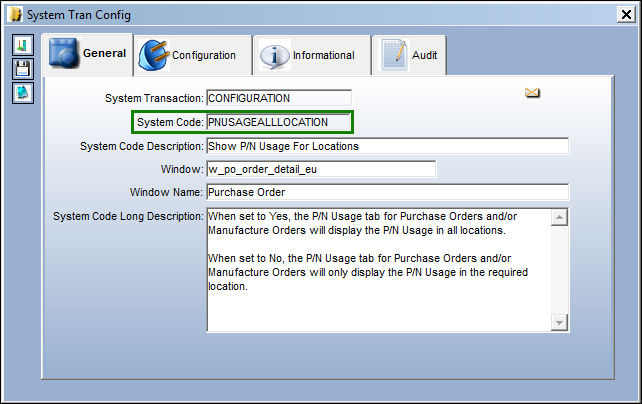
PNUSAGEALLLOCATION


Switch Set to Yes:

When set to Yes, the P/N Usage tab, for Purchase Orders and/or Manufacture Orders will display the P/N Usage in all locations.
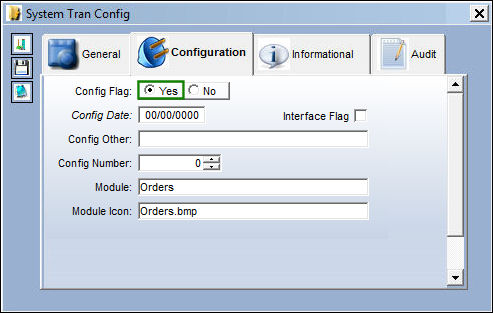
ORDERS_yes

In the Purchase Order window, select into the desired order number.
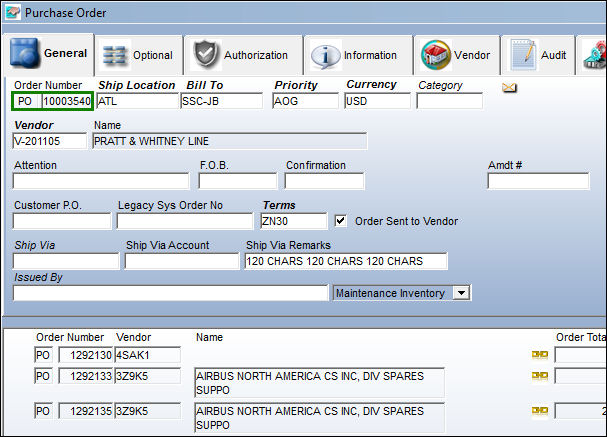
PNUSAGEALLLOCATION_Yes1

In the Purchase Order Detail, P/N Usage tab, the user is able to see the multiple locations that part AT ENGINE T701D has been previously issued to as well as the required shipping location.
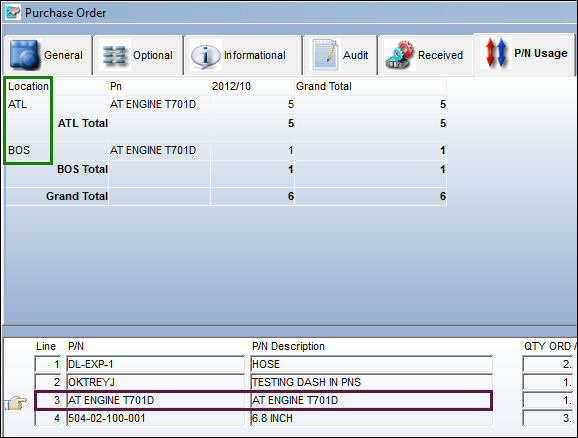
PNUSAGEALLLOCATION_Yes2

This also affects Manufacture Orders. Select into the desired Manufacture Order.
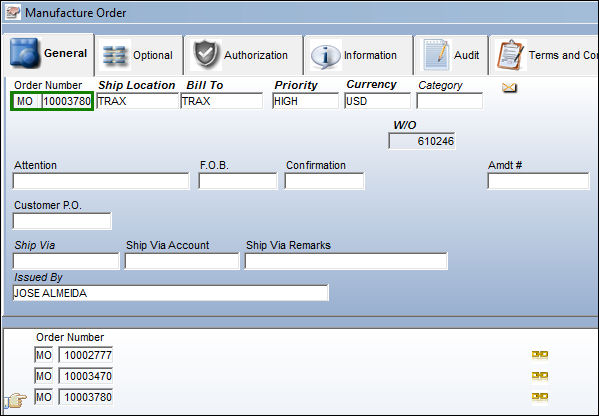
PNUSAGEALLLOCATION_Yes4

In the Manufacture Order Detail, P/N Usage tab, the user is able to see the multiple locations that part DLC-100 has been previously issued to as well as the required shipping location.
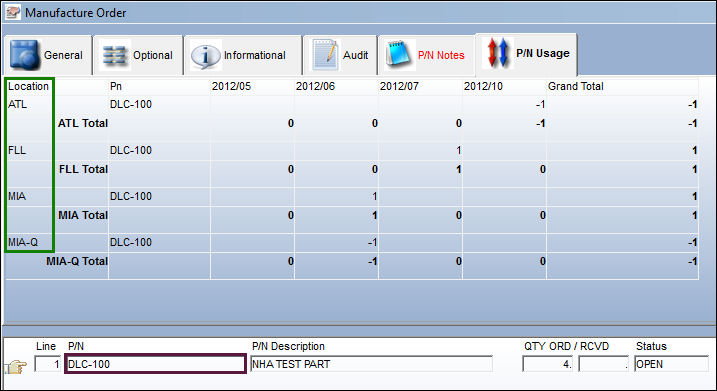
PNUSAGEALLLOCATION_Yes3


Switch Set to No:

When set to No, the P/N Usage tab for Purchase Orders and/or Manufacture Orders will only display the P/N Usage in the required location.
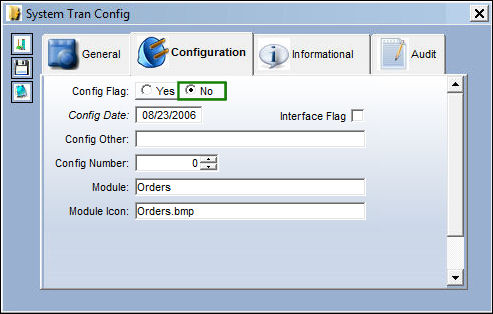
ORDERS_no

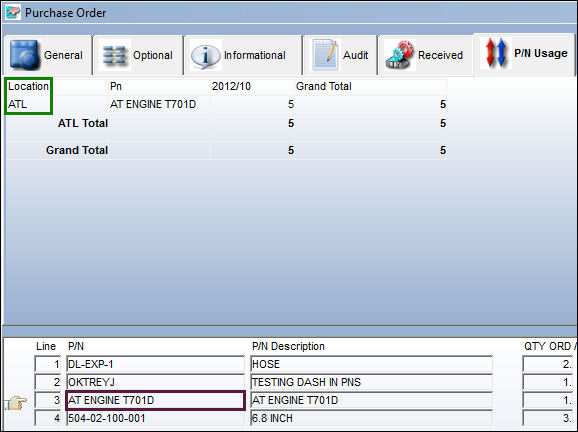
In the Purchase Order window, select into the desired order number.
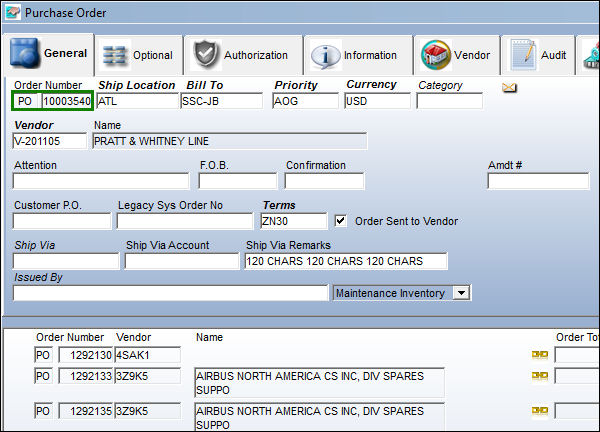
PNUSAGEALLLOCATION_No1

In the Purchase Order detail, P/N Usage tab, the user is able to see that part AT ENGINE T701D only displays the required order location whereas all previous locations are omitted.
PNUSAGEALLLOCATION_No2

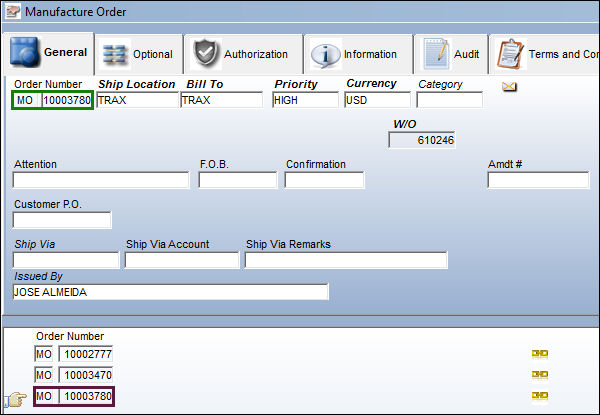
In the Manufacture Order window, select into the desired order number.
PNUSAGEALLLOCATION_No3

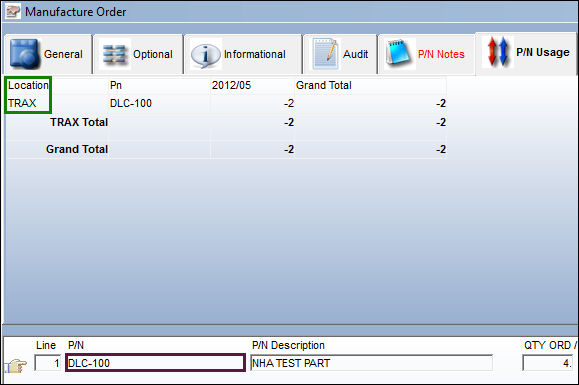
In the Manufacture Order detail window, P/N Usage tab, the user is able to see that part DLC-100 only displays the required location whereas all previous usage locations are ommited.
PNUSAGEALLLOCATION_No4

See Also

Orders Switches

ADDLSTAC - Add Last A/C P/N Transaction To The R/O

ADDLSTACEX - Add Last A/C P/N Transaction an E/X in AeroComponent Service

ALWPRTISSE - Allow User Defined Quantities for Auto Issue of Purchase Order

ASSFOL - N/L/A Follows Parts On Repair Orders

AUTOMESSAGELOAD - Send Message Load messages Automatically upon receiving Order Completion Message

AUTOROS - ROS Auto Repair Orders Sent to Vendor

AUTREQWTP - Auto Populate W/O and Task Card information from Requisition in the PO

AXTRNTYP - Aeroxchange Transaction Type

BILLTO - Order Bill To Functions

BOOKTO - Repair Order Book To (Radio Button) Selected By Default

CAPEXGL - Capital Expenditure Default G/L

CATROWO - R/O Category Not Required if R/O Header Has Work Order

CHKLIFEFLG - Check for Shelf and Tool Life Expiration

COCAPEX - Contract Order Capital Expenditure field Mandatory

COMATDASHBOARD - Refresh Time of Comat Flight Dashboard

EOSINSTALLDETAIL - Show installation of P/N S/N that replaces the exchange sent P/N S/N or show original installation detail of the exchange sent P/N S/N

CONTBLOC - Contract Order Loaded By Location

COPOREORAUT - P/O Authorization Status For Reorder Contract Order

CUSTOMSSEQ - Next Sequential Number for a Customs Record

DEFDESREMREA - Removal Reason added to Defect field of Repair Order Detail, Removal Tab

EXCAPEX - E/X Capital Expenditure (field) Mandatory

EXCATMAN - E/X Category Mandatory

EXCVTGL - Convert R/O to E/X G/L Defaults to P/N R/O G/L

EXDESCRIPTION - Exchange Order Line Item P/N Description (field) Mandatory

EXPRICECHANGEAUTH - Closed E/X Price Change Authorization Required based on Authorized Spend Limit

EXREQRQ - Exchange Order Requisition Required For Each Line

EXTOPOLINE - Retain the Order Line when converting from an Exchange Order to a Purchase Order

GREYACTIONRO - Grey Out Action Field Once The Repair Order Is Saved

HIDEORDERGRAPH - Hide the Graphs Section in the Order Header Windows

LINKDOCRO - Repair Order linked to Engineering Control's Attachments

LOANDAY - Loan Order Number Of Days To Allow For Packing And Shipping

LOCAPEX - Loan Order Capital Expenditure (field) Mandatory

LOCATMAN - Loan Order Category (field) Mandatory

LODESCRIPTION - Loan Order Line Item P/N Description (field) Mandatory

LOPRICECHANGEAUTH - Closed L/O Price Change Authorization Required based on Authorized Spend Limit

LOREQRQ - Loan Order Requisition Required For Each Line

LOTOEXLINE - Retain the Order Line when converting a Loan Order to Exchange Order

LOTOPOLINE - Retain the Order Line when converting a Loan Order to Purchase Order

MANUTRANS - Use Spec2K ROS Transmission Code as the Manufacturer Code in Spec2K/ROS messages

NOAUTOEXFORADV - Auto Exchange Order Not Created if Non-fulfilled Advanced E/X Exists for Part

NOCANCELORD - No Status Change or Notification when Exception Order is Received by Customer with QTY=0

OPTION1 - Material Certification With Full Traceability To Original Equipment Manufacturer (OEM) or Airline Required

OPTION2 - JAA or FAA Certification Required

OPTION3 - Tear Down Report Must Accompany Shipment

OPTION4 - Repair Estimate Must Be Approved Prior To Accomplishing Repair or Not

OPTIONFT - Switch's System Code Description Field Polulates Order Print's Footer

ORCAPEXSP - Capital Expenditure Drop Down Selection Suppressed

ORDADDOVRCHK - Automatically Flag the Override Address checkbox on All Orders

ORDAWBTRIAGE - Display the AWB Triage field on the Order AWB Window and Show Soft Warning

ORDBILL - (No Longer in Use)

ORDERAUTHBYEMAIL - Enable the Order Authorization by Email

ORDERAUTOVR - Standard Order Authorization Override

ORDERDFT - Orders Duty, Freight and Tax Display (fields) disabled

ORDERDUT - Enable Duty Cost field

ORDERGLSEL - Protect G/L and allow selection only of G/L account with same G/L Value

ORDERMCURR - Currency field Protected in Orders

ORDERTAX - Orders Tax Display

ORDUNFIL - Order Unfulfilled Icon in Supervisor

ORDWARR - Warning For Order Warranty

ORECMSG - Orders E/C Notification

PBHSEQ - Power By The Hour Seq

PNNOTSOFT - Allow Software Load During A/C P/N Transaction and A/C Initial P/N Load

PNOTESPONLY - Only Display P/O Notes via the P/O Detail P/N Notes Tab

PNREFCST - Update P/N Reference Cost Based on P/O Unit Cost

POCAPEX - Purchase Order Capital Expenditure field Mandatory

POCATMAN - Purchase Order Category Mandatory

PODESCRIPTION - Purchase Order Line Item P/N Description (field) Mandatory

POGLDFCL - Do Not Auto Populate Inventory G/L On A Purchase Order

POIMPORTNORCV - P/O Not Automatically Received through Vendor P/O Data Import

POIMPORTNOTAUTH - P/O Not Automatically Authorized through Vendor P/O Data Import

POLINE1 - Purchase Orders Can Only Have One Line Item

POLINE1SPEC2K - Purchase Orders Can Only Have 1 Line Item for Spec2000 Vendors

POMINQTY - Validate Order Levels With Less Than Minimum ORD QTY

POPRICECHANGEAUTH - Closed P/O Price Change Authorization Required based on Authorized Spend Limit

PORCVAU - Do Not Allow Unauthorized P/Os To Be Received

POREQRQ - Requisition Field Mandatory for Purchase Order

POSEQ - Purchase Orders Next Sequence Number

POTOEXLINE - Retain the Order Line when converting a Purchase Order to Exchange Order

PRECAFTRO - Print Engineering Individual Detail After the Repair Order

PRINTALLDO - Print Document Control from Receiving Inspection and Order Receiving

RECLINKDISCST - Display Close Order Discrepancy Pop Up Upon Receiving An Order

REQAUTRQ - Validate for Authorization When Attaching a Requisition

REVALINV - Revalidate the Invoice at Order Receiving

REVALINVRI - Revalidates the Invoice at R/I

RLAUTORD - Send Order for Authorization if Mandatory Field on Header is Changed

ROADDDOC - Repair Order Print with Attached Documents

ROADDGL2 - Default R/O GL 2 values auto-populate on Repair Order creation

ROAURMV - (No Longer in Use)

ROAUTLCK - Repair Orders That Have Been Authorized Cannot Be Edited Without Unlock Button

ROAUWAR - Repair Order Auto Warranty Claim

ROCAPEX - Repair Order Capital Expenditure

ROCAPLSTMD - Repair Order Capability List Mandatory

ROCATMAN - Repair Order Category (field) Mandatory

RODESCRIPTION - Repair Order Line Item P/N Description (field) Mandatory

ROFOLTDF - Repair Orders Fault Found checkbox Defaults

ROLINE1 - Repair Orders Can Only Have 1 Line Item

ROLOCSCQ - Repair Order Batch Items Must Be Quarantine and Have Location Security

ROPENDINGEC - Prevent Unauthorized Pending E/Cs From Being Added To An RO

ROPNAUSEL - R/O Auto-Selects P/N Control or E/C based on the Warning % Due

ROPNCTLP - R/O Default P/N Control Print

ROPRICECHANGEAUTH - Closed R/O Price Change Authorization Required based on Authorized Spend Limit

ROPRVEND - Remove Authorization on a Repair Order with Preferred Vendor

RORCVAU - Do Not Allow Unauthorized R/Os To Be Received

ROREASREM - Notes on One Step Transfer appear on Removal Tab via RO

ROREQRQ - Repair Order Requisition Required For Each Line

ROSHOPNLA - R/O Shop Create W/O NLA For P/N NLA

ROTATPS - Enables Easier Tracking of TAT for Repair Orders

ROTOEXLINE - Retain the Order Line when converting a Repair Order to Exchange Order

ROWARFOC - Repair Order FOC Auto Flag Warranty Items

S2KTRANSFIELDMAND - Spec2K Transaction Field Mandatory for PO

SAMEINTERC - E/X Send/Receive P/Ns have to be the Same, One-Way Interchangeable, or Both-Way Interchangeable

SELPNCTRLREMOVEREACH - Automatically Select P/N Control on a R/O if Scheduled Removals are Reached

SHIPVIAMAN- Ship Via Field is Mandatory for all Order Types

SHPWOROPUP - Shop W/O E/Cs and Controls not automatically populated from R/O

SPEC2K/AUTHAMOUNT - Remove Authorization when Updated P/O Exceeds User's Authorized Amount

SPEC2KEXP_DATE - Re-calculate DEL Date For Incoming and Outgoing Messages

SVBOOKTO - Service Order 'Book To' (Radio Button) Selected By Default

SVCAPEX - Service Order Capital Expenditure Field Mandatory

SVCATMAN - Makes Category Field Mandatory for Service Orders

SVDESCRIPTION - Service Order Item Description field Mandatory

SVEDCTPR - Service Order Express Contractor Prompt

SVEDLOC - Service Order Express Default Location

SVEDPRIO - Service Order Express Default Priority

SVORECBT - Disable Order Receiving Button for Service Orders

SVPRICECHANGEAUTH - Closed S/V Price Change Authorization Required based on Authorized Spend Limit

SVRCVAU - Service Order Receive Verify Authorization

SVREQRQ - Service Order Requisition Required For Each Line

TAXINCPREVENT - Prevent P/N S/N Received with a Tax Incentive Number to be Issued to a Customer Order

TEARDADDFIELDS - New Checkboxes and Fields in Tear Down Report

TODASHBOARD - This switch is not in use

TODFTQTY - Default Quantity of P/N to Null for Transfer Order

TOFIFOBATCH - Transfer Order Auto-Select FIFO Batch

TOPNCTRL - Part with Expired Control Cannot be Transfered

TOREQRQ - Transfer Order Requisition Required For Each Line

TORIDEF - Transfer Order R/I Reset On Receiving (checkbox) Default

USEVENCOSTRO - Use P/N Unit Cost from Vendor Record in Repair Orders

VNDLIST - Update Vendor Print List From Order

WCCAPEX - W/C Capital Expenditure Field is Mandatory

WCDESCRIPTION - Warranty Claim Order Line Item P/N Description (field) Mandatory

Top of Page Publication Date: 8/17/2026 Share Print