|
TRAX MANUALS > Inventory > Inventory Module > Inventory, Update Menu > Inventory Transaction > Inventory Transaction Buttons > Return To Owner Button, via Inventory Transaction
Return To Owner Button, via Inventory Transaction
The Return To Owner  button is used to return an owned part to its owner. When an owner is associated with a part, the part will indicate that its owner via Inventory/Update/Inventory Transaction window. button is used to return an owned part to its owner. When an owner is associated with a part, the part will indicate that its owner via Inventory/Update/Inventory Transaction window.
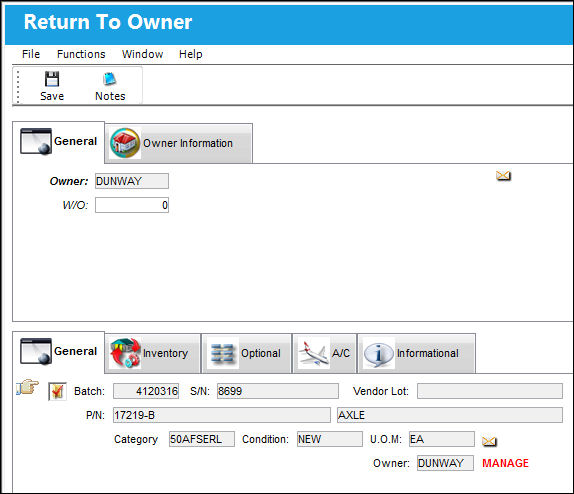
The following information/options are available in this window:
_____________________________________________________________________________________
Owner
The owner (customer) who is associated with this part on the order. When an Owner is associated with the part, the part will indicate that it is consigned (with the Consigned icon) via Inventory/Update/Inventory Transaction.
W/O
The Work Order used to categorize, manage, and schedule work requirements for aircraft maintenance.
_____________________________________________________________________________________
Additional information can be viewed and included in the Return To Owner, Owner Information Tab and the Notes  button. button.
Note: The Return to Owner button should NOT be used to complete a Repair Order (or any other type of order). Using the Return to Owner option will close the Order without properly receiving the order.
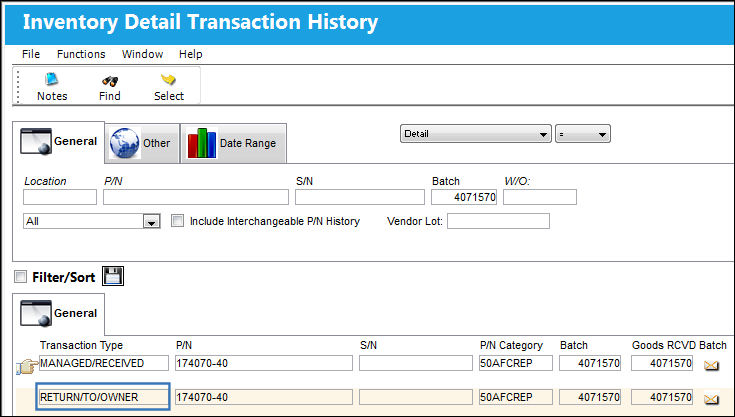
 RETURN/TO/OWNER Transaction Type: RETURN/TO/OWNER Transaction Type:
A Return To Owner transaction type has been added when a batch is split and some parts are returned to the owner. The system now tracks owned parts that have been returned to their owner.
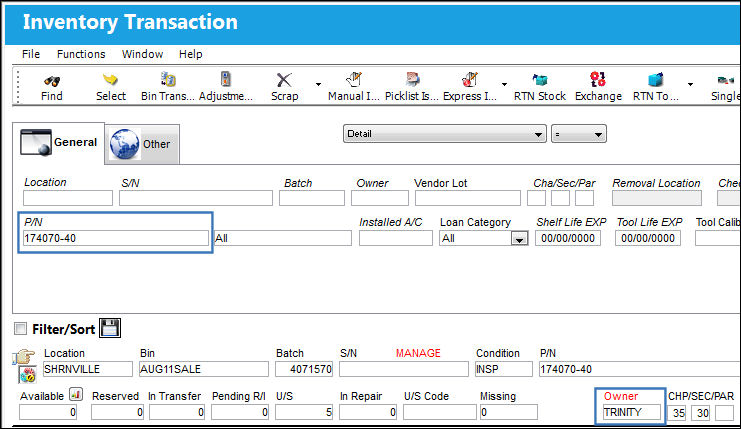
The following part is owned and four are available in inventory.
Two parts are moved to another bin:
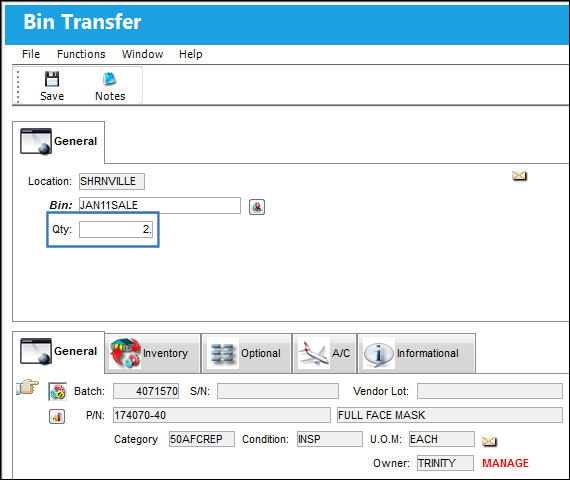
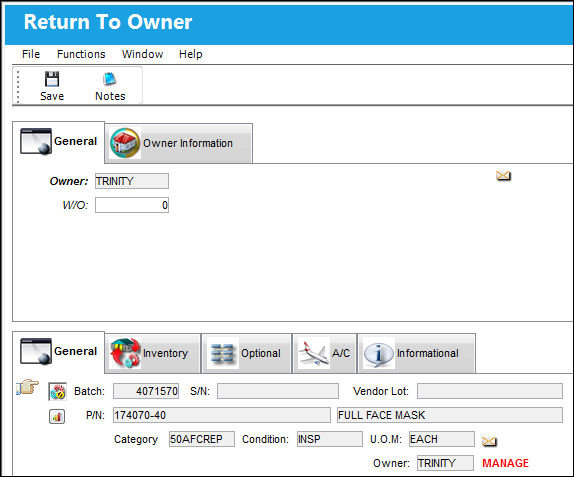
The quantity has been split into two separate batches. Complete a Return To Owner transaction for the original batch (7262244).
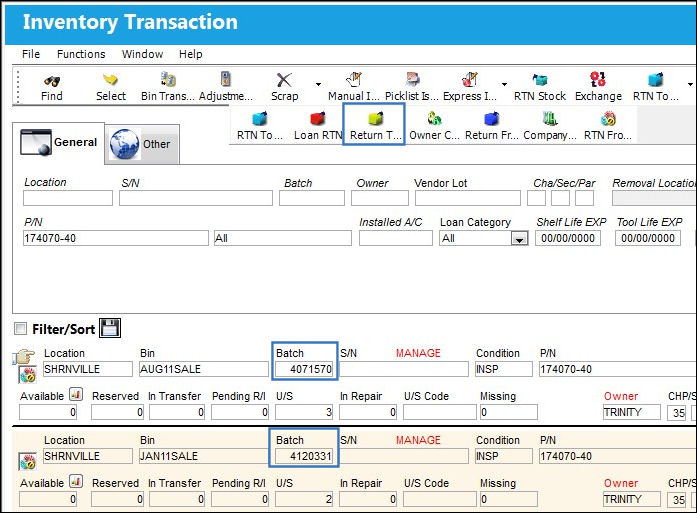
Return To Owner transaction:
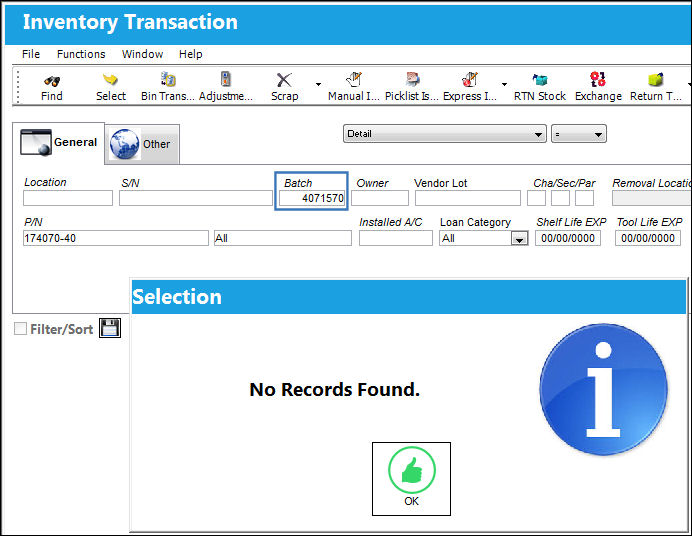
The original batch is no longer in inventory:
The Return/To/Owner transaction is recorded for the batch that was returned to it's owner:
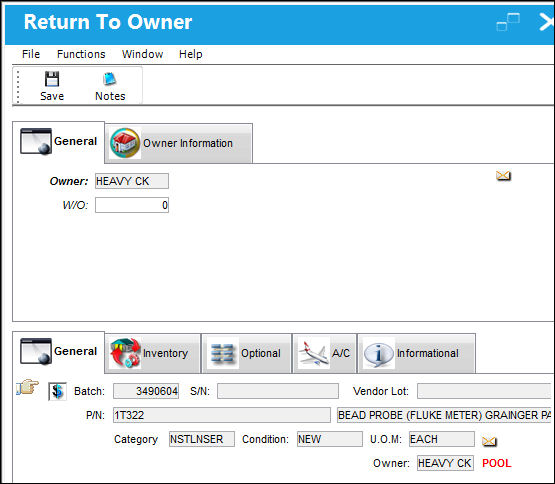
 Returning P/N Pool Parts to Owner: Returning P/N Pool Parts to Owner:
P/N Pool parts can be returned to their Owner.
|
In This Section Notes Button, via Return To Owner |
See Also Inventory Transaction Buttons Bin Transfer Button, via Inventory Transaction Adjustment Button, via Inventory Transaction Scrap Button, via Inventory Transaction P/N Missing Button, via Inventory Transaction Lost Button, via Inventory Transaction Manual Issue Button, via Inventory Transaction Picklist Issue Button [V15], via Inventory Transaction Picklist Issue Button, via Inventory Transaction Express Issue Button, via Inventory Transaction Express Issue Auto Button, via Inventory Transaction Return To Stock Button, via Inventory Transaction Exchange Button, via Inventory Transaction Return To Vendor Button, via Inventory Transaction Loan Return Button, via Inventory Transaction Owner Change Button, via Inventory Transaction Return From Customer Button, via Inventory Transaction Company Change Button, via Inventory Transaction Return to LHT Button, via Inventory Transaction Return From Quarantine Button, via Inventory Transaction Single Button, via Inventory Transaction Multi Button, via Inventory Transaction ASRS Transfer Order Button, via Inventory Transaction ASRS Multi Store Button, via Inventory Transaction Request Tray Button, via Inventory Transaction Break All Button, via Inventory Transaction Break P/N Button, via Inventory Transaction Re-Build Kit Button, via Inventory Transaction Build Multi Kit Button, via Inventory Transaction Rental Button, via Inventory Transaction Requisition Button, via Inventory Transaction Custom Duty Change Button, via Inventory Transaction P/N Master Button, via Inventory Transaction Interchangeable Button, via Inventory Transaction Order Button, via Inventory Transaction Bin Control Button, via Inventory Transaction Image Button, via Inventory Transaction P/N S/N Change Button, via Inventory Transaction Document Control Button Manual Button, via Inventory Transaction P/N-S/N Position Change Button, via Inventory Transaction Document Change Button, via Inventory Transaction P/N Detail Print Button, via Inventory Transaction P/N Initial Times Accrual Button, via Inventory Transaction Release From RO Button, via Inventory Transaction Import Software Button, via Inventory Transaction Bin Replace Import Button Notes Button, via Inventory Transaction Import P/N Birth Date Button, via Inventory Transaction Update Reserved Quantity Button, via Inventory Transaction Update Transfer Quantity Button, via Inventory Transaction Cycle Count Button, via Inventory Transaction Box Button, via Inventory Transaction Hold Button, via Inventory Transaction NLA Position Swap Button, via Inventory Transaction Tool Check-In Button, via Inventory Transaction (Tools Locator) Tool Check-Out Button, via Inventory Transaction (Tools Locator) Tool Concession Button, via Inventory Transaction (Tools Locator) Tool Calibration Change Button, via Inventory Transaction (Tools Locator) |
|

 Share
Share
 Print
Print


