|
TRAX MANUALS > Inventory > Inventory Module > Inventory, Update Menu > Inventory Transaction > Inventory Transaction Buttons > Cycle Count Button, via Inventory Transaction
Cycle Count Button, via Inventory Transaction

The Cycle Count  button allows users to enter new counts and/or modify existing counts entered in the Physical Inventory Count window for all parts with a cycle count code. button allows users to enter new counts and/or modify existing counts entered in the Physical Inventory Count window for all parts with a cycle count code.
 This button is security-controlled via Inventory/Update/Inventory Transaction/Cycle Count. For more information refer to the Security Explorer section of the System Administration Training Manual. This button is security-controlled via Inventory/Update/Inventory Transaction/Cycle Count. For more information refer to the Security Explorer section of the System Administration Training Manual.
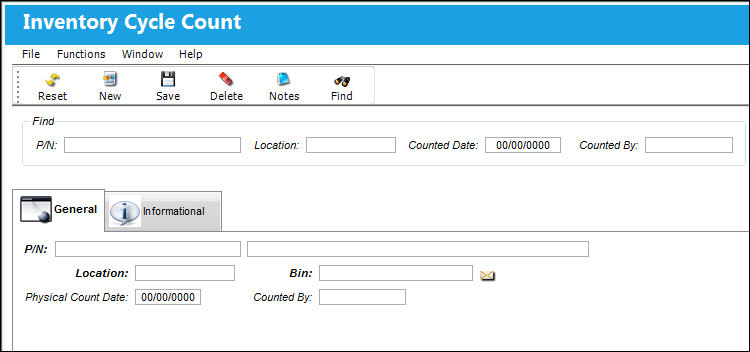
In the Find section of the Inventory Cycle Count window, the user can search for existing Inventory Count information by entering the P/N, Location, Counted Date, and/or Counted By information.
_____________________________________________________________________________________
P/N
The Part Number with a cycle count code that was counted.
Location
The location where the count was generated.
Counted Date
The date the count was generated.
Counted By
The name of the user who generated the inventory count.
_____________________________________________________________________________________
To add an additional count to an existing count, select the New  button and in the General tab, enter the P/N, Location, and Bin information. Select the Save button and in the General tab, enter the P/N, Location, and Bin information. Select the Save  button and the part will be added to the most recent Cycle Count for the specified location. To delete an existing count, select the Delete button and the part will be added to the most recent Cycle Count for the specified location. To delete an existing count, select the Delete  button. The Delete button allows users to delete existing counts. button. The Delete button allows users to delete existing counts.
This button is security-controlled via Inventory/Update/Inventory Transaction/Cycle Count Delete. For more information refer to the Security Explorer section of the System Administration Training Manual.
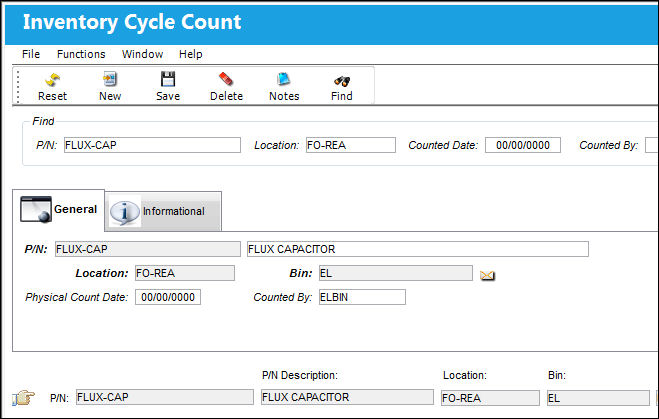
The following information/options are available in this window:
_____________________________________________________________________________________
P/N
Select the P/N that is to be added to an existing count.
Location
Select the location where the manual count was performed.
Physical Count Date 
The date the P/N was manually counted.
Counted By
The name of the user who generated the inventory count.
_____________________________________________________________________________________
|
See Also Inventory Transaction Buttons Bin Transfer Button, via Inventory Transaction Adjustment Button, via Inventory Transaction Scrap Button, via Inventory Transaction P/N Missing Button, via Inventory Transaction Lost Button, via Inventory Transaction Manual Issue Button, via Inventory Transaction Picklist Issue Button [V15], via Inventory Transaction Picklist Issue Button, via Inventory Transaction Express Issue Button, via Inventory Transaction Express Issue Auto Button, via Inventory Transaction Return To Stock Button, via Inventory Transaction Exchange Button, via Inventory Transaction Return To Vendor Button, via Inventory Transaction Loan Return Button, via Inventory Transaction Return To Owner Button, via Inventory Transaction Owner Change Button, via Inventory Transaction Return From Customer Button, via Inventory Transaction Company Change Button, via Inventory Transaction Return to LHT Button, via Inventory Transaction Return From Quarantine Button, via Inventory Transaction Single Button, via Inventory Transaction Multi Button, via Inventory Transaction ASRS Transfer Order Button, via Inventory Transaction ASRS Multi Store Button, via Inventory Transaction Request Tray Button, via Inventory Transaction Break All Button, via Inventory Transaction Break P/N Button, via Inventory Transaction Re-Build Kit Button, via Inventory Transaction Build Multi Kit Button, via Inventory Transaction Rental Button, via Inventory Transaction Requisition Button, via Inventory Transaction Custom Duty Change Button, via Inventory Transaction P/N Master Button, via Inventory Transaction Interchangeable Button, via Inventory Transaction Order Button, via Inventory Transaction Bin Control Button, via Inventory Transaction Image Button, via Inventory Transaction P/N S/N Change Button, via Inventory Transaction Document Control Button Manual Button, via Inventory Transaction P/N-S/N Position Change Button, via Inventory Transaction Document Change Button, via Inventory Transaction P/N Detail Print Button, via Inventory Transaction P/N Initial Times Accrual Button, via Inventory Transaction Release From RO Button, via Inventory Transaction Import Software Button, via Inventory Transaction Bin Replace Import Button Notes Button, via Inventory Transaction Import P/N Birth Date Button, via Inventory Transaction Update Reserved Quantity Button, via Inventory Transaction Update Transfer Quantity Button, via Inventory Transaction Box Button, via Inventory Transaction Hold Button, via Inventory Transaction NLA Position Swap Button, via Inventory Transaction Tool Check-In Button, via Inventory Transaction (Tools Locator) Tool Check-Out Button, via Inventory Transaction (Tools Locator) Tool Concession Button, via Inventory Transaction (Tools Locator) Tool Calibration Change Button, via Inventory Transaction (Tools Locator) |
|

 Share
Share
 Print
Print


